Tidb
Architecture
01.LSM-Tree与RocksDB
02.TiDB 构架
03.TiDB 架构演进
PD
TiKV
TiFlash
TiProxy
Installation and Deployment
Tidb 敏捷模式部署
Data Migration and Validation
Backup and Recovery
Command-Line Tool
Optimization and Adjustment
如何通过调整`split-region-size`参数来动态优化Region分裂阈值?
本文档使用 MrDoc 发布
-
+
首页
Tidb 敏捷模式部署
# 环境准备 操作系统:Rocky Linux release 8.10 (Green Obsidian) 主机配置:官方建议的最低配置,8C ,16G # 1. 部署TEM > 注意:在启动TEM的过程中,会默认启动⼀套TiDB作为元数据库,元数据库的配置请⻅:附录-元数据库配置⽂件。(在部署过程中,如发现元数据库对应端⼝被占⽤,请编辑附录-元数据库配置⽂件) ## 1..1 什么是TEM? 平凯数据库企业级运维管理平台(简称:TEM)是一款为 TiDB 打造的一站式全生命周期管理平台,面向 TiDB(平凯数据库 v7.1 及 TiDB 社区版 v6.5 以上版本)提供,让用户在一个 Web 界面内即可完成 TiDB 集群**部署/纳管/升级**、参数配置、节点扩缩容、综合监控、告警、自动化备份策略、故障自愈与性能诊断、任务定时执行、服务器/集群 CPU、内存、磁盘 I/O 等资源利用实时可视化。实现数据库统一资源池建设,彻底告别多集群、多组件来回切换及复杂命令行,让大规模、多集群场景下的运维更简单、更安全、更自动化。 ## 1.2. 元数据库配置文件 编辑`metadb_topology.yaml`文件: ``` global: user: "tidb" ssh_port: 22 deploy_dir: "/tidb-deploy" data_dir: "/tidb-data" arch: "amd64" pd_servers: - host: 127.0.0.1 tidb_servers: - host: 127.0.0.1 port: 4000 tikv_servers: - host: 127.0.0.1 ``` ## 1.3. TEM 配置文件 在解压后的安装包目录下,编辑 TEM 配置文件:`config.yaml` ⽂件中相应的配置,指定与 TEM 和 元数据库相关的各个参数,重点需要配置下面红色注释的地方: ``` global: user: "tidb" group: "tidb" ssh_port: 22 deploy_dir: "/tem-deploy" data_dir: "/tem-data" arch: "amd64" log_level: "info" enable_tls: false # 是否开启TLS验证,开启后如果不配置证书密钥,则会生成自签证书和密钥 server_configs: # 这里指定tem 节点的全局配置 tem_servers: db_addresses: "127.0.0.1:4000" # 填写 metadb 配置的套接字,若配置了多个元数据库的地址,应以逗号分隔且确保⽆空格 db_u: "root" # 若由 tem 辅助创建的元数据库,请使⽤ root ⽤户 db_pwd: "" # 若由 tem 辅助创建的元数据库,请使⽤空密码 db_name: "test" # 若由 tem 辅助创建的元数据库,请使⽤ test 数据库 log_filename: "/tem-deploy/tem-server-8080/log/tem.log" log_tem_level: "info" log_max_size: 300 log_max_days: 30 log_max_backups: 0 external_tls_cert: "" # tem 对外使用的tls证书 external_tls_key: "" # tem 对外使用的tls密钥 internal_tls_ca_cert: "" # tem 内部节点间双向验证使用的tls证书 internal_tls_cert: "" # tem 内部节点间双向验证使用的tls证书 internal_tls_key: "" # tem 内部节点间双向验证使用的tls证书 tem_servers: - host: "0.0.0.0" # 请填写 tem 节点的实际地址 port: 8080 mirror_repo: true # 是否开启镜像仓库,多个TEM节点时,最多只允许一个节点的开启 ``` **请注意:开关 TLS 只能在部署时选择,部署后不可更改,如果 TEM 开启 TLS 则需要元数据库也同步开启 TLS。** 下面是一个配置⽂件的示例: ``` global: user: "tidb" group: "tidb" ssh_port: 22 deploy_dir: "/tem-deploy" data_dir: "/tem-data" arch: "amd64" log_level: "info" enable_tls: false # 是否开启TLS验证 server_configs: # 这⾥指定 tem 节点的全局配置 tem_servers: db_addresses: "127.0.0.1:4000" # 填写 metadb 配置的套接字,若配置了多个元数据库的地址,应以逗号分隔且确保⽆空格 db_u: "root" # 若由 tem 辅助创建的元数据库,请使⽤ root ⽤户 db_pwd: "" # 若由 tem 辅助创建的元数据库,请使⽤空密码 db_name: "test" # 若由 tem 辅助创建的元数据库,请使⽤ test 数据库 log_filename: "/tem-deploy/tem-server-8080/log/tem.log" log_tem_level: "info" log_max_size: 300 log_max_days: 0 log_max_backups: 0 external_tls_cert: "" # tem 对外使用的tls证书 external_tls_key: "" # tem 对外使用的tls密钥 internal_tls_ca_cert: "" # tem 内部节点间双向验证使用的tls证书 internal_tls_cert: "" # tem 内部节点间双向验证使用的tls证书 internal_tls_key: "" # tem 内部节点间双向验证使用的tls证书 tem_servers: - host: "127.0.0.1" # 请填写 tem 节点的实际地址 port: 8080 mirror_repo: true # 是否开启镜像仓库,多个TEM节点时,有且仅有一个节点开启 - host: "127.0.0.2" port: 8080 mirror_repo: false # 是否开启镜像仓库,多个TEM节点时,有且仅有一个节点开启 - host: "127.0.0.3" port: 8080 mirror_repo: false # 是否开启镜像仓库,多个TEM节点时,有且仅有一个节点开启 ``` step 3.执⾏部署TEM命令 为了避免部署时出现异常,请确保部署TEM的所有主机上没有被部署其他的TiUP软件 ``` # 使⽤ root 或者具有 sudo 权限的账⼾执⾏该脚本。 sudo ./install.sh ``` step 4.安装后检查 部署完成之后,TEM服务会⾃动启动,请使⽤下⾯的地址访问TEM: http://<TEM 部署ip地址>:<port>/login TEM默认⽤⼾为admin,默认密码为admin(请在登录后在TEM⻚⾯-设置-⽤⼾与⻆⾊-⽤⼾尽快修 改)。 ## 1.4. 执⾏部署 TEM 命令 部署过程: ``` [root@xx-01 tem-package-v3.1.0-linux-amd64]# ./install.sh #### Please make sure that you have edited user #### #### in config.yaml as you want, and don't # #### The user is 'tidb' by default, which will be ### #### used as the owner to deploy TEM service. #### #### If you have installed TEM before, make sure #### #### that the user is consistent with the old one. # #### After install.sh is run, a config.yaml file #### #### will be generated under /home/<user>/, and #### #### please don't edit this file. #### Do you want to continue? [y/N] y start installing Check linux amd64 ##### install version v3.1.0 ##### ##### metadb_topology.yaml exists, will install metadb ##### ##### add user tidb started ##### Generating public/private rsa key pair. Created directory '/home/tidb/.ssh'. Your identification has been saved in /home/tidb/.ssh/id_rsa Your public key has been saved in /home/tidb/.ssh/id_rsa.pub The key fingerprint is: SHA256:QpsQ2nJcXgdd2KAtafieguAUZlt6XG7vlc62SW+hPXM tidb@tidb The key's randomart image is: +---[RSA 3072]----+ | . . ooo=. | | + + o =o . | | * * = = . | | o O = = . | | = o * S | | o o o + . .. | | . . . + +o . | | o =oo= E | | ..=o.+ | +----[SHA256]-----+ ##### ssh-keygen ~/.ssh/id_rsa ##### ##### cat ~/.ssh/authorized_keys ##### ##### user chmod .ssh finished ##### ##### add user tidb finished ##### ##### add PrivateKey /home/tidb/.ssh/id_rsa ##### ##### add PublicKey /home/tidb/.ssh/id_rsa.pub ##### ##### check depends tar started ##### Last login: Fri Sep 19 10:17:08 CST 2025 Dependency check check_ssh-copy-id proceeding. Dependency check check_ssh-copy-id end. Dependency check check_scp proceeding. Dependency check check_scp end. Dependency check check_ssh proceeding. Dependency check check_ssh end. ##### check depends tar finished ##### ##### check env started: before possible metadb installation ##### assistant check {"level":"debug","msg":"ssh"} strategyName Check NetWorkStatus Start: 1758248230 NetWorkStatus End : 1758248233 Net Status , OK SSHCheck 0.0.0.0 authorized_keys id_rsa id_rsa.pub success TEM assistant check {"level":"debug","msg":"ssh"} strategyName Check NetWorkStatus Start: 1758248230 NetWorkStatus End : 1758248233 Net Status , OK SSHCheck 0.0.0.0 authorized_keys id_rsa id_rsa.pub success ##### check env finished: before possible metadb installation ##### ##### deploy_tiup started ##### ##### prepare TiDB AND TEM TIUP_HOME started ##### ##### mkdir /tem-deploy/.tiup finished ##### ##### mkdir /tem-deploy/.tem finished ##### ##### mkdir /tem-deploy/.tiup/bin finished ##### ##### mkdir /tem-deploy/.tem/bin finished ##### ##### mkdir /tem-data/tidb-repo finished ##### ##### mkdir /tem-data/tem-repo finished ##### ##### mkdir /tem-deploy/monitor finished ##### ##### mkdir /home/tidb/.temmeta finished ##### ##### mkdir /home/tidb/.temmeta/bin finished ##### ##### mkdir /home/tidb/tidb-repo finished ##### ##### prepare TiDB AND TEM TIUP_HOME finished ##### ##### deploy_binary started ##### ##### mkdir /tem-deploy/tem-package finished ##### ##### mkdir /tem-deploy/tem-package/tem-toolkit-v3.1.0-linux-amd64 finished ##### ##### mkdir /tem-deploy/tem-package/tidb-toolkit-v3.1.0-linux-amd64 finished ##### ##### deploy_binary finished ##### ##### install tiup binary to /tem-deploy/.tiup/bin /tem-deploy/.tem/bin started ##### ##### install tiup binary to /tem-deploy/.tiup/bin /tem-deploy/.tem/bin finished ##### ##### install TiUP to /usr/local/bin started ##### ##### install TiUP to /usr/local/bin finished ##### ##### init tem mirror /tem-data/tem-repo started ##### ##### build_mirror started ##### ##### build_mirror repo_dir /tem-data/tem-repo ##### ##### build_mirror home_dir /tem-deploy/.tem ##### ##### build_mirror tiup_bin /usr/local/bin/tiup ##### ##### build_mirror toolkit_dir /tem-deploy/tem-package/tem-toolkit-v3.1.0-linux-amd64 ##### ##### build_mirror deploy_user tidb ##### Last login: Fri Sep 19 10:17:09 CST 2025 ./ ./local_install.sh ./tem-v3.1.0-linux-amd64.tar.gz ./node-exporter-v1.2.2-linux-amd64.tar.gz ./1.prometheus.json ./1.alertmanager.json ./grafana-v7.5.15-linux-amd64.tar.gz ./1.grafana.json ./keys/ ./keys/b7a47c72bf7ff51f-root.json ./keys/8d862a21510f57fe-timestamp.json ./keys/92686f28f94bcc9c-snapshot.json ./keys/cd6238bf63753458-root.json ./keys/d9da78461bae5fb8-root.json ./keys/87cc8597ba186ab8-pingcap.json ./keys/c181aeb3996f7bfe-index.json ./root.json ./1.tiup.json ./1.tem-server.json ./1.index.json ./1.root.json ./alertmanager-v0.23.0-linux-amd64.tar.gz ./prometheus-v2.29.2-linux-amd64.tar.gz ./tiup-v1.14.0-linux-amd64.tar.gz ./tem-server-v3.1.0-linux-amd64.tar.gz ./tiup-linux-amd64.tar.gz ./snapshot.json ./1.tem.json ./timestamp.json ./1.node-exporter.json Successfully set mirror to /tem-data/tem-repo ##### init tem mirror /tem-data/tem-repo finished ##### ##### init tidb mirror /tem-data/tidb-repo started ##### ##### build_mirror started ##### ##### build_mirror repo_dir /tem-data/tidb-repo ##### ##### build_mirror home_dir /tem-deploy/.tiup ##### ##### build_mirror tiup_bin /usr/local/bin/tiup ##### ##### build_mirror toolkit_dir /tem-deploy/tem-package/tidb-toolkit-v3.1.0-linux-amd64 ##### ##### build_mirror deploy_user tidb ##### Last login: Fri Sep 19 10:17:15 CST 2025 ./ ./local_install.sh ./prometheuse-v6.5.0-linux-amd64.tar.gz ./1.br-ee.json ./alertmanager-v0.17.0-linux-amd64.tar.gz ./1.alertmanager.json ./br-v7.1.5-linux-amd64.tar.gz ./1.cluster.json ./br-v8.1.0-linux-amd64.tar.gz ./1.tikv.json ./br-v6.1.7-linux-amd64.tar.gz ./keys/ ./keys/bd73fb49a9fe4c1f-root.json ./keys/ccb014427c930f35-root.json ./keys/0ef7038b19901f8d-root.json ./keys/e80212bba0a0c5d7-timestamp.json ./keys/cdc237d3f9580e59-index.json ./keys/704b6a90d209834a-pingcap.json ./keys/37ae6a6f7c3ae619-root.json ./keys/42859495dc518ea9-snapshot.json ./keys/6f1519e475e9ae65-root.json ./keys/bfc5831da481f289-index.json ./keys/4fa53899faebf9d9-root.json ./keys/928bfc0ffaa29a53-timestamp.json ./keys/7b99f462f7931ade-snapshot.json ./keys/24f464d5e96770ca-pingcap.json ./1.prometheuse.json ./br-v6.5.10-linux-amd64.tar.gz ./root.json ./1.tidb.json ./1.tiup.json ./1.pd.json ./1.index.json ./1.root.json ./tikv-v6.5.0-linux-amd64.tar.gz ./pd-v6.5.0-linux-amd64.tar.gz ./cluster-v1.14.0-linux-amd64.tar.gz ./blackbox_exporter-v0.21.1-linux-amd64.tar.gz ./5.br.json ./br-v7.5.2-linux-amd64.tar.gz ./tiup-v1.14.0-linux-amd64.tar.gz ./1.node_exporter.json ./1.insight.json ./tiup-linux-amd64.tar.gz ./insight-v0.4.2-linux-amd64.tar.gz ./br-ee-v7.1.1-3-linux-amd64.tar.gz ./snapshot.json ./node_exporter-v1.3.1-linux-amd64.tar.gz ./tidb-v6.5.0-linux-amd64.tar.gz ./1.blackbox_exporter.json ./timestamp.json Successfully set mirror to /tem-data/tidb-repo ##### init tidb mirror /tem-data/tidb-repo finished ##### ##### init temmeta mirror /home/tidb/tidb-repo started ##### ##### build_mirror started ##### ##### build_mirror repo_dir /home/tidb/tidb-repo ##### ##### build_mirror home_dir /home/tidb/.temmeta ##### ##### build_mirror tiup_bin /usr/local/bin/tiup ##### ##### build_mirror toolkit_dir /tem-deploy/tem-package/tidb-toolkit-v3.1.0-linux-amd64 ##### ##### build_mirror deploy_user tidb ##### Last login: Fri Sep 19 10:17:23 CST 2025 ./ ./local_install.sh ./prometheuse-v6.5.0-linux-amd64.tar.gz ./1.br-ee.json ./alertmanager-v0.17.0-linux-amd64.tar.gz ./1.alertmanager.json ./br-v7.1.5-linux-amd64.tar.gz ./1.cluster.json ./br-v8.1.0-linux-amd64.tar.gz ./1.tikv.json ./br-v6.1.7-linux-amd64.tar.gz ./keys/ ./keys/bd73fb49a9fe4c1f-root.json ./keys/ccb014427c930f35-root.json ./keys/0ef7038b19901f8d-root.json ./keys/e80212bba0a0c5d7-timestamp.json ./keys/cdc237d3f9580e59-index.json ./keys/704b6a90d209834a-pingcap.json ./keys/37ae6a6f7c3ae619-root.json ./keys/42859495dc518ea9-snapshot.json ./keys/6f1519e475e9ae65-root.json ./keys/bfc5831da481f289-index.json ./keys/4fa53899faebf9d9-root.json ./keys/928bfc0ffaa29a53-timestamp.json ./keys/7b99f462f7931ade-snapshot.json ./keys/24f464d5e96770ca-pingcap.json ./1.prometheuse.json ./br-v6.5.10-linux-amd64.tar.gz ./root.json ./1.tidb.json ./1.tiup.json ./1.pd.json ./1.index.json ./1.root.json ./tikv-v6.5.0-linux-amd64.tar.gz ./pd-v6.5.0-linux-amd64.tar.gz ./cluster-v1.14.0-linux-amd64.tar.gz ./blackbox_exporter-v0.21.1-linux-amd64.tar.gz ./5.br.json ./br-v7.5.2-linux-amd64.tar.gz ./tiup-v1.14.0-linux-amd64.tar.gz ./1.node_exporter.json ./1.insight.json ./tiup-linux-amd64.tar.gz ./insight-v0.4.2-linux-amd64.tar.gz ./br-ee-v7.1.1-3-linux-amd64.tar.gz ./snapshot.json ./node_exporter-v1.3.1-linux-amd64.tar.gz ./tidb-v6.5.0-linux-amd64.tar.gz ./1.blackbox_exporter.json ./timestamp.json Successfully set mirror to /home/tidb/tidb-repo ##### init temmeta mirror /home/tidb/tidb-repo finished ##### ##### deploy_tiup /tem-deploy/.tem finished ##### ##### install metadb started ##### Last login: Fri Sep 19 10:17:52 CST 2025 The component `prometheus` not found (may be deleted from repository); skipped tiup is checking updates for component cluster ... A new version of cluster is available: The latest version: v1.14.0 Local installed version: Update current component: tiup update cluster Update all components: tiup update --all The component `cluster` version is not installed; downloading from repository. Starting component `cluster`: /home/tidb/.temmeta/components/cluster/v1.14.0/tiup-cluster deploy tem_metadb v6.5.0 metadb_topology.yaml -u tidb -i /home/tidb/.ssh/id_rsa --yes + Detect CPU Arch Name - Detecting node 127.0.0.1 Arch info ... Done + Detect CPU OS Name - Detecting node 127.0.0.1 OS info ... Done + Generate SSH keys ... Done + Download TiDB components - Download pd:v6.5.0 (linux/amd64) ... Done - Download tikv:v6.5.0 (linux/amd64) ... Done - Download tidb:v6.5.0 (linux/amd64) ... Done - Download node_exporter: (linux/amd64) ... Done - Download blackbox_exporter: (linux/amd64) ... Done + Initialize target host environments - Prepare 127.0.0.1:22 ... Done + Deploy TiDB instance - Copy pd -> 127.0.0.1 ... Done - Copy tikv -> 127.0.0.1 ... Done - Copy tidb -> 127.0.0.1 ... Done - Deploy node_exporter -> 127.0.0.1 ... Done - Deploy blackbox_exporter -> 127.0.0.1 ... Done + Copy certificate to remote host + Init instance configs - Generate config pd -> 127.0.0.1:2379 ... Done - Generate config tikv -> 127.0.0.1:20160 ... Done - Generate config tidb -> 127.0.0.1:4000 ... Done + Init monitor configs - Generate config node_exporter -> 127.0.0.1 ... Done - Generate config blackbox_exporter -> 127.0.0.1 ... Done Enabling component pd Enabling instance 127.0.0.1:2379 Enable instance 127.0.0.1:2379 success Enabling component tikv Enabling instance 127.0.0.1:20160 Enable instance 127.0.0.1:20160 success Enabling component tidb Enabling instance 127.0.0.1:4000 Enable instance 127.0.0.1:4000 success Enabling component node_exporter Enabling instance 127.0.0.1 Enable 127.0.0.1 success Enabling component blackbox_exporter Enabling instance 127.0.0.1 Enable 127.0.0.1 success Cluster `tem_metadb` deployed successfully, you can start it with command: `tiup cluster start tem_metadb --init` tiup is checking updates for component cluster ... Starting component `cluster`: /home/tidb/.temmeta/components/cluster/v1.14.0/tiup-cluster start tem_metadb Starting cluster tem_metadb... + [ Serial ] - SSHKeySet: privateKey=/home/tidb/.temmeta/storage/cluster/clusters/tem_metadb/ssh/id_rsa, publicKey=/home/tidb/.temmeta/storage/cluster/clusters/tem_metadb/ssh/id_rsa.pub + [Parallel] - UserSSH: user=tidb, host=127.0.0.1 + [Parallel] - UserSSH: user=tidb, host=127.0.0.1 + [Parallel] - UserSSH: user=tidb, host=127.0.0.1 + [ Serial ] - StartCluster Starting component pd Starting instance 127.0.0.1:2379 Start instance 127.0.0.1:2379 success Starting component tikv Starting instance 127.0.0.1:20160 Start instance 127.0.0.1:20160 success Starting component tidb Starting instance 127.0.0.1:4000 Start instance 127.0.0.1:4000 success Starting component node_exporter Starting instance 127.0.0.1 Start 127.0.0.1 success Starting component blackbox_exporter Starting instance 127.0.0.1 Start 127.0.0.1 success + [ Serial ] - UpdateTopology: cluster=tem_metadb Started cluster `tem_metadb` successfully ##### install metadb finished ##### ##### check env started: after metadb installation ##### assistant check {"level":"debug","msg":"ssh"} strategyName Check success for 127.0.0.1:4000 success NetWorkStatus Start: 1758248374 NetWorkStatus End : 1758248377 Net Status , OK SSHCheck 0.0.0.0 authorized_keys id_rsa id_rsa.pub success TEM assistant check {"level":"debug","msg":"ssh"} strategyName Check success for 127.0.0.1:4000 success NetWorkStatus Start: 1758248374 NetWorkStatus End : 1758248377 Net Status , OK SSHCheck 0.0.0.0 authorized_keys id_rsa id_rsa.pub success ##### check env finished: after metadb installation ##### ##### generate config /home/tidb/config.yaml started ##### assistant run {"level":"debug","msg":"ssh"} strategyName Install success for 127.0.0.1:4000 success success TEM assistant run {"level":"debug","msg":"ssh"} strategyName Install success for 127.0.0.1:4000 success success ##### assistant run /home/tidb/config.yaml {"level":"debug","msg":"ssh"} strategyName Install success for 127.0.0.1:4000 success success finished ##### Detected shell: bash Shell profile: /home/tidb/.bash_profile Last login: Fri Sep 19 10:18:47 CST 2025 tiup is checking updates for component tem ... Starting component `tem`: /tem-deploy/.tem/components/tem/v3.1.0/tiup-tem tls-gen tem-servers TLS certificate for cluster tem-servers generated tiup is checking updates for component tem ... Starting component `tem`: /tem-deploy/.tem/components/tem/v3.1.0/tiup-tem deploy tem-servers v3.1.0 /home/tidb/config.yaml -u tidb -i /home/tidb/.ssh/id_rsa --yes + Generate SSH keys ... Done + Download components - Download tem-server:v3.1.0 (linux/amd64) ... Done + Initialize target host environments - Prepare 0.0.0.0:22 ... Done + Copy files - Copy tem-server -> 0.0.0.0 ... Done Enabling component tem-server Enabling instance 0.0.0.0:8080 Enable instance 0.0.0.0:8080 success Cluster `tem-servers` deployed successfully, you can start it with command: `TIUP_HOME=/home/<user>/.tem tiup tem start tem-servers`, where user is defined in config.yaml. by default: `TIUP_HOME=/home/tidb/.tem tiup tem start tem-servers` tiup is checking updates for component tem ... Starting component `tem`: /tem-deploy/.tem/components/tem/v3.1.0/tiup-tem start tem-servers Starting cluster tem-servers... + [ Serial ] - SSHKeySet: privateKey=/tem-deploy/.tem/storage/tem/clusters/tem-servers/ssh/id_rsa, publicKey=/tem-deploy/.tem/storage/tem/clusters/tem-servers/ssh/id_rsa.pub + [Parallel] - UserSSH: user=tidb, host=0.0.0.0 + [ Serial ] - StartCluster Starting cluster ComponentName tem-server... Starting component tem-server Starting instance 0.0.0.0:8080 Start instance 0.0.0.0:8080 success Started tem `tem-servers` successfully tiup is checking updates for component tem ... Starting component `tem`: /tem-deploy/.tem/components/tem/v3.1.0/tiup-tem display tem-servers Cluster type: tem Cluster name: tem-servers Cluster version: v3.1.0 Deploy user: tidb SSH type: builtin WebServer URL: ID Role Host Ports OS/Arch Status Data Dir Deploy Dir -- ---- ---- ----- ------- ------ -------- ---------- 0.0.0.0:8080 tem-server 0.0.0.0 8080 linux/x86_64 Up /tem-data/tem-server-8080 /tem-deploy/tem-server-8080 Total nodes: 1 /home/tidb/.bash_profile has been modified to to add tiup to PATH open a new terminal or source /home/tidb/.bash_profile to use it Installed path: /usr/local/bin/tiup ===================================================================== TEM service has been deployed on host <ip addresses> successfully, please use below command check the status of TEM service: 1. Switch user: su - tidb 2. source /home/tidb/.bash_profile 3. Have a try: TIUP_HOME=/tem-deploy/.tem tiup tem display tem-servers ==================================================================== [root@xx-01 tem-package-v3.1.0-linux-amd64]# ``` 查看部署完成使用的端口: ``` [root@xx-01 tem-package-v3.1.0-linux-amd64]# ss -lntp State Recv-Q Send-Q Local Address:Port Peer Address:Port Process LISTEN 0 128 0.0.0.0:22 0.0.0.0:* users:(("sshd",pid=814,fd=3)) LISTEN 0 4096 127.0.0.1:34067 0.0.0.0:* users:(("pd-server",pid=5583,fd=31)) LISTEN 0 4096 127.0.0.1:36793 0.0.0.0:* users:(("pd-server",pid=5583,fd=32)) LISTEN 0 128 0.0.0.0:20180 0.0.0.0:* users:(("tikv-server",pid=5685,fd=98)) LISTEN 0 128 [::]:22 [::]:* users:(("sshd",pid=814,fd=4)) LISTEN 0 4096 *:9115 *:* users:(("blackbox_export",pid=6293,fd=3)) LISTEN 0 4096 *:9100 *:* users:(("node_exporter",pid=6215,fd=3)) LISTEN 0 4096 *:50055 *:* users:(("tem",pid=7346,fd=7)) LISTEN 0 4096 *:10080 *:* users:(("tidb-server",pid=5907,fd=22)) LISTEN 0 4096 *:2380 *:* users:(("pd-server",pid=5583,fd=8)) LISTEN 0 4096 *:2379 *:* users:(("pd-server",pid=5583,fd=9)) LISTEN 0 4096 *:20160 *:* users:(("tikv-server",pid=5685,fd=86)) LISTEN 0 4096 *:20160 *:* users:(("tikv-server",pid=5685,fd=85)) LISTEN 0 4096 *:20160 *:* users:(("tikv-server",pid=5685,fd=87)) LISTEN 0 4096 *:20160 *:* users:(("tikv-server",pid=5685,fd=88)) LISTEN 0 4096 *:20160 *:* users:(("tikv-server",pid=5685,fd=89)) LISTEN 0 4096 *:4000 *:* users:(("tidb-server",pid=5907,fd=20)) LISTEN 0 4096 *:8080 *:* users:(("tem",pid=7346,fd=36)) [root@xx-01 tem-package-v3.1.0-linux-amd64]# ``` 为了避免部署时出现异常,请确保部署 TEM 的所有主机上没有被部署其他的 TiUP 软件 ``` [root@tidb tem-package-v3.1.0-linux-amd64]# su - tidb Last login: Fri Sep 19 10:19:44 CST 2025 [tidb@tidb ~]$ source /home/tidb/.bash_profile [tidb@tidb ~]$ TIUP_HOME=/tem-deploy/.tem tiup tem display tem-servers tiup is checking updates for component tem ... Starting component `tem`: /tem-deploy/.tem/components/tem/v3.1.0/tiup-tem display tem-servers Cluster type: tem Cluster name: tem-servers Cluster version: v3.1.0 Deploy user: tidb SSH type: builtin WebServer URL: ID Role Host Ports OS/Arch Status Data Dir Deploy Dir -- ---- ---- ----- ------- ------ -------- ---------- 0.0.0.0:8080 tem-server 0.0.0.0 8080 linux/x86_64 Up /tem-data/tem-server-8080 /tem-deploy/tem-server-8080 Total nodes: 1 [tidb@tidb ~]$ ``` 安装后检查 部署完成之后,TEM 服务会⾃动启动,从上面可以获得 tem-server 服务的端口,请使⽤下⾯的地址访问 TEM: http://<TEM 部署ip地址>:<port>/login  TEM 默认⽤户为 admin, 默认密码为 admin。 > 请在登录后在 TEM 页面 ----> 设置 ----> 用户与角色 ---> 用户, 重置密码。 # 2. 用 TEM 部署平凯数据库敏捷模式 ## 2.1. 配置凭证 配置凭证用于访问中控机或主机,配置步骤如下: step 1.点击“设置 ---> 凭证 ---> 主机 ---> 添加凭证” 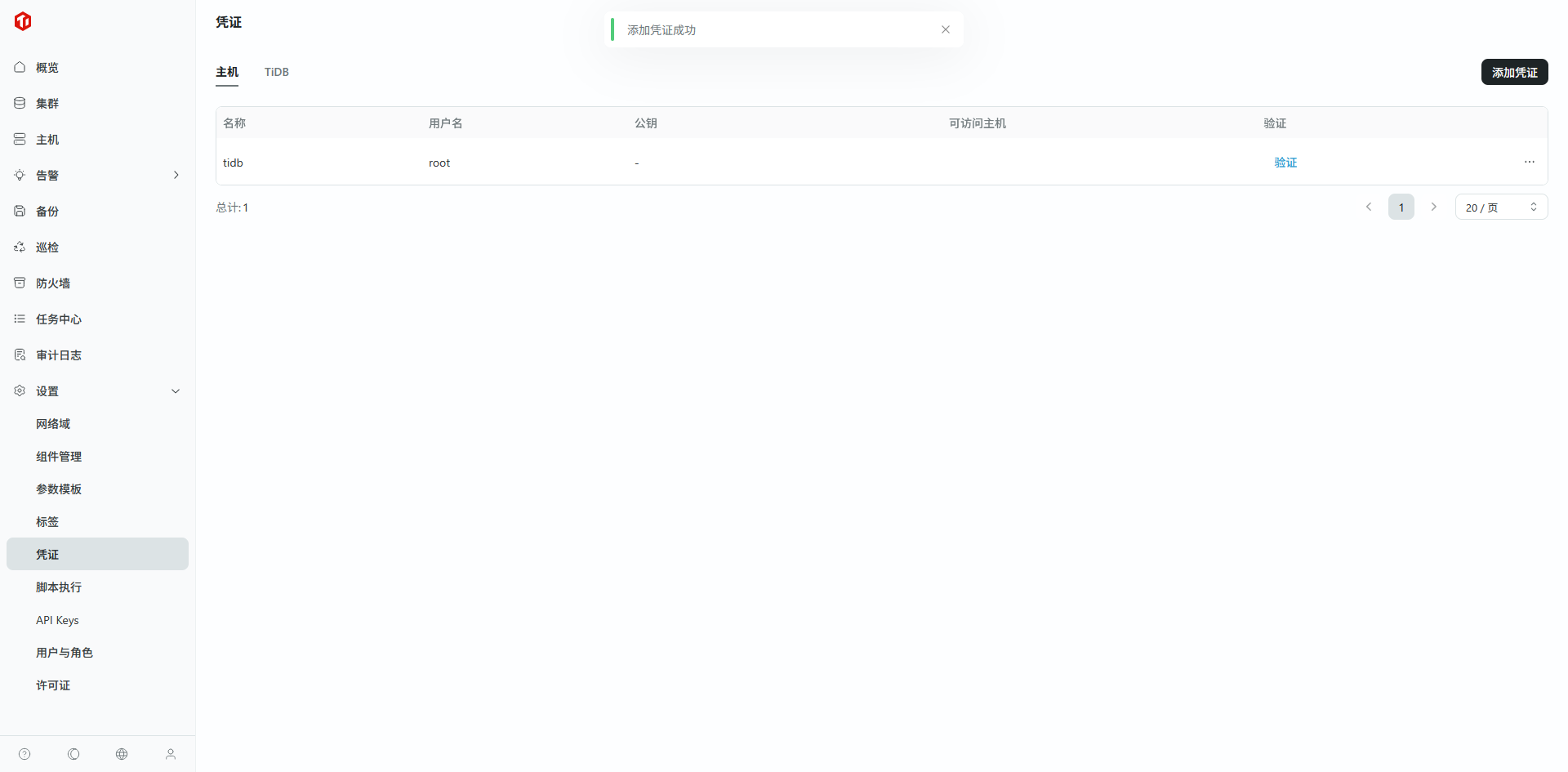 step 2.填写被控主机/中控机的 ssh 登录凭证,点击“确认”添加 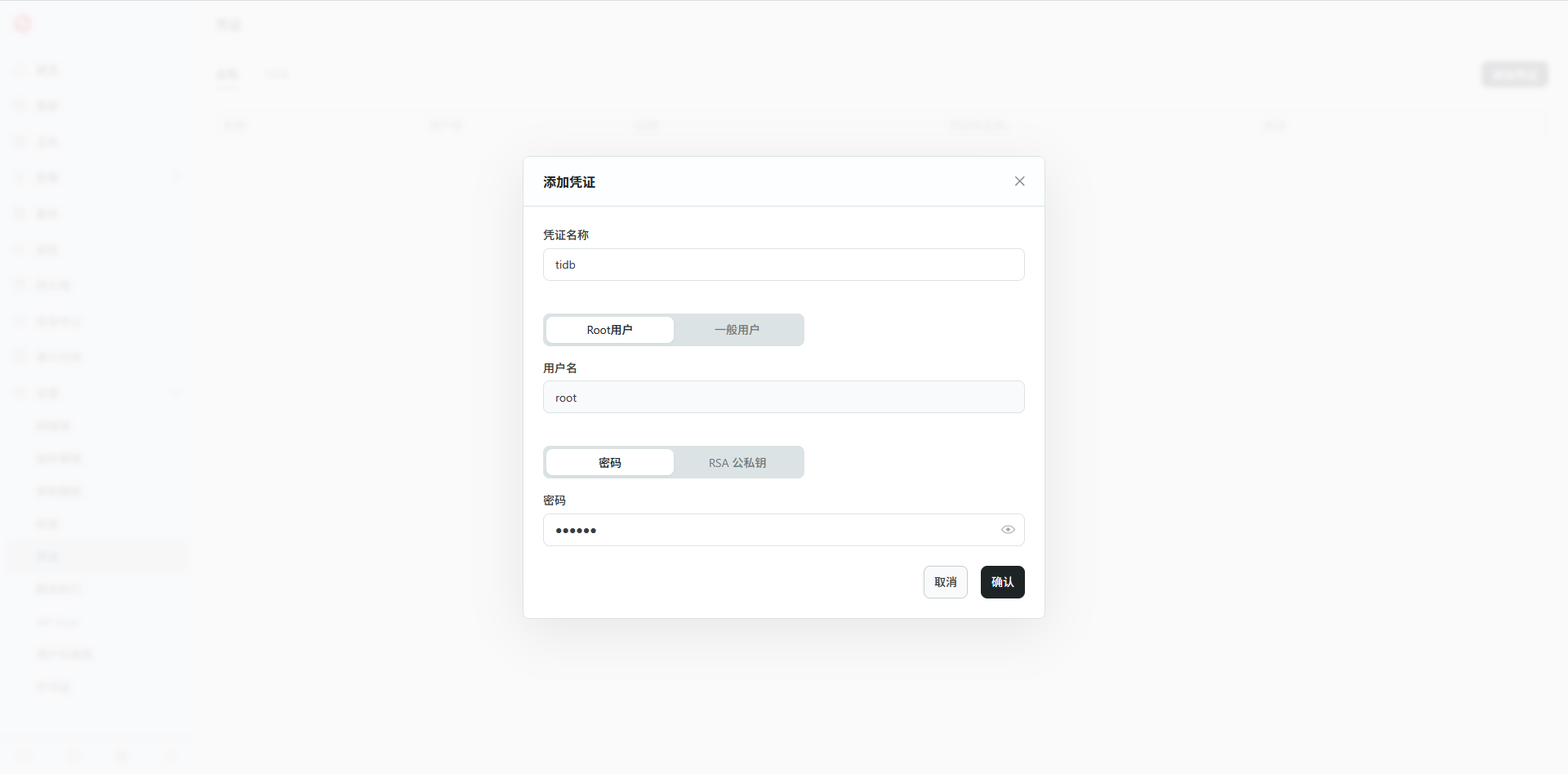 step 3.检查凭证是否添加成功 ## 2.2. 上传敏捷模式安装包 step 1.下载平凯数据库敏捷模式安装包(180 天),用于导入到 TEM 中 在 平凯数据库敏捷模式安装包 ,解压该 .zip 包后,其内文件如下 ``` [root@xx-01 amd64]# ll total 3434696 -rw-r--r-- 1 root root 2412466993 Jul 7 11:21 tidb-ee-server-v7.1.8-5.2-20250630-linux-amd64.tar.gz # 检查 tidb-ee-server 压缩包 -rw-r--r-- 1 root root 65 Jul 7 11:13 tidb-ee-server-v7.1.8-5.2-20250630-linux-amd64.tar.gz.sha256 -rw-r--r-- 1 root root 1104649418 Jul 7 11:18 tidb-ee-toolkit-v7.1.8-5.2-20250630-linux-amd64.tar.gz # 检查 tidb-ee-toolkit 压缩包 -rw-r--r-- 1 root root 65 Jul 7 11:13 tidb-ee-toolkit-v7.1.8-5.2-20250630-linux-amd64.tar.gz.sha256 [root@xx-01 amd64]# ``` step 2.点击“设置 -> 组件管理 -> 添加组件” 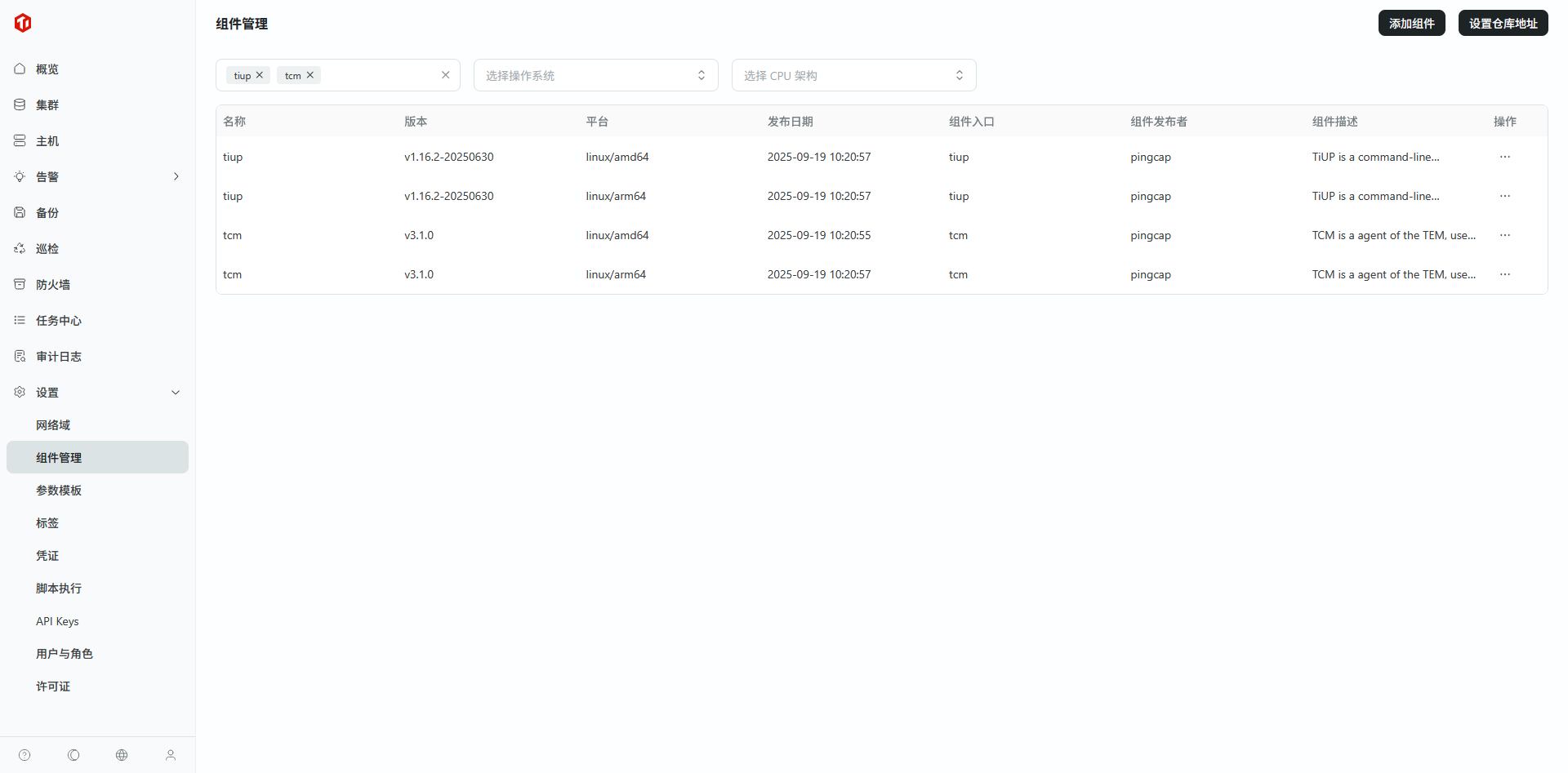 step 3.包类型选择“组件镜像",导入方式选择“本地上传” 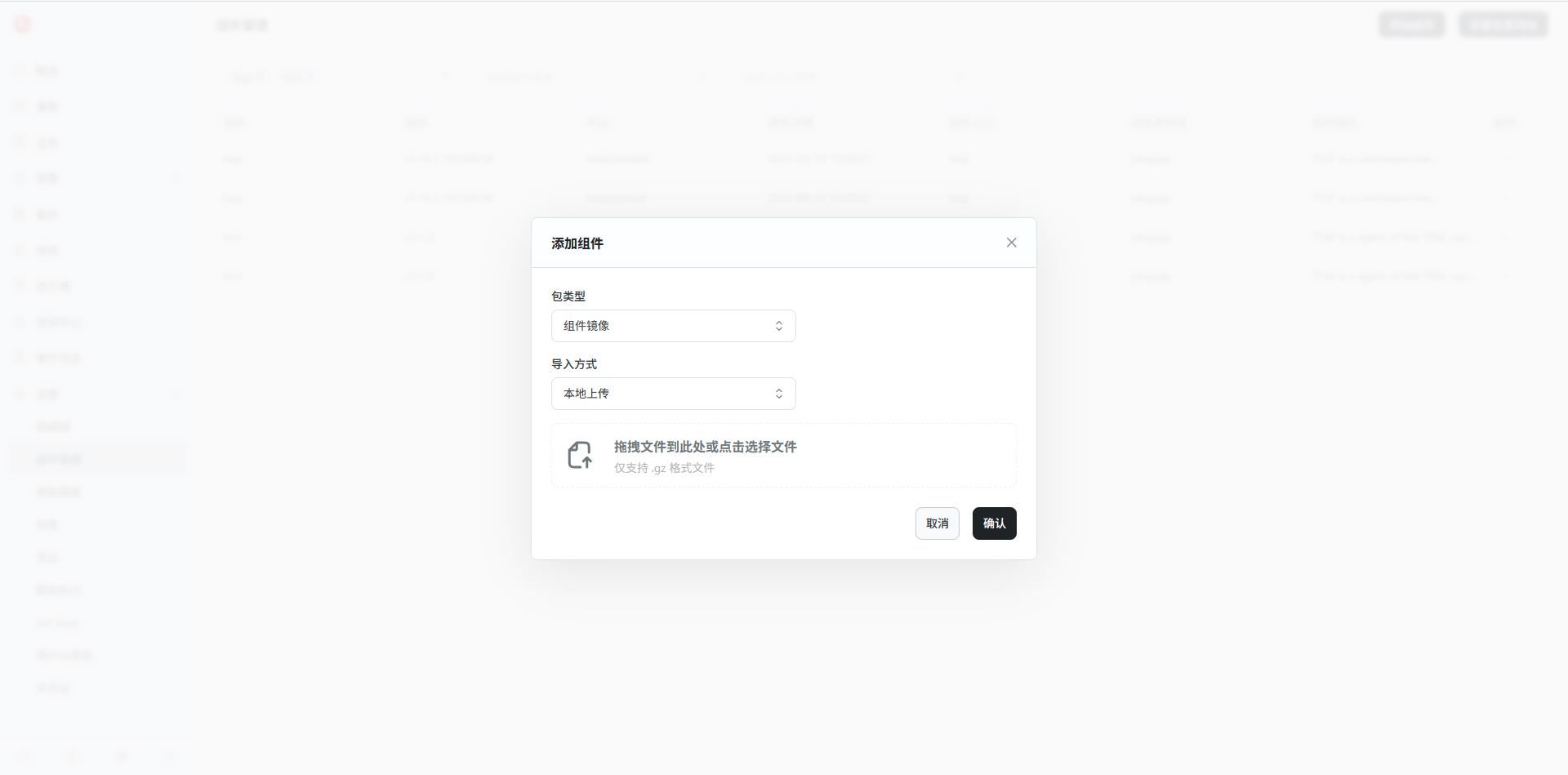 step 4.导入平凯数据库敏捷模式安装包和工具包 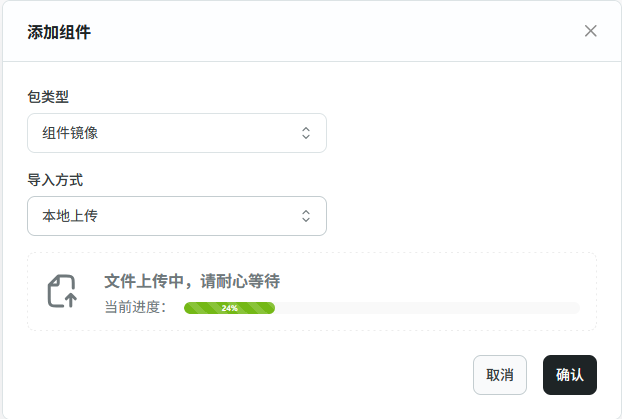 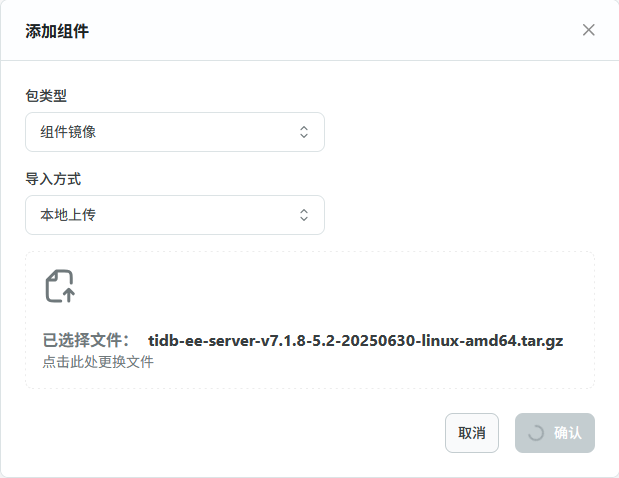 等待上传完成。 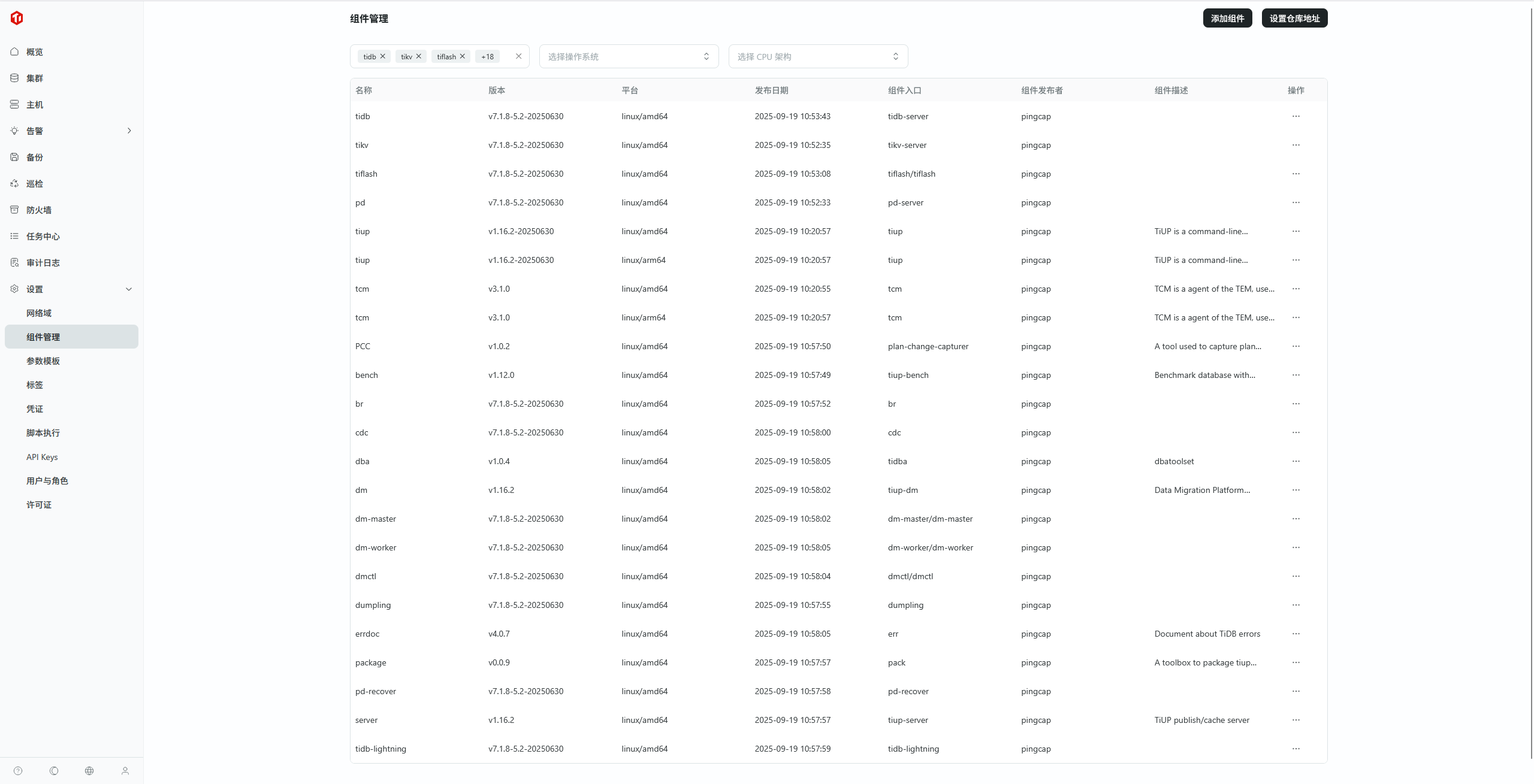 ## 2.3. 配置中控机 接下来配置集群中控机,配置步骤如下: step 1.点击“主机 -> 集群管理中控机 -> 添加中控机” 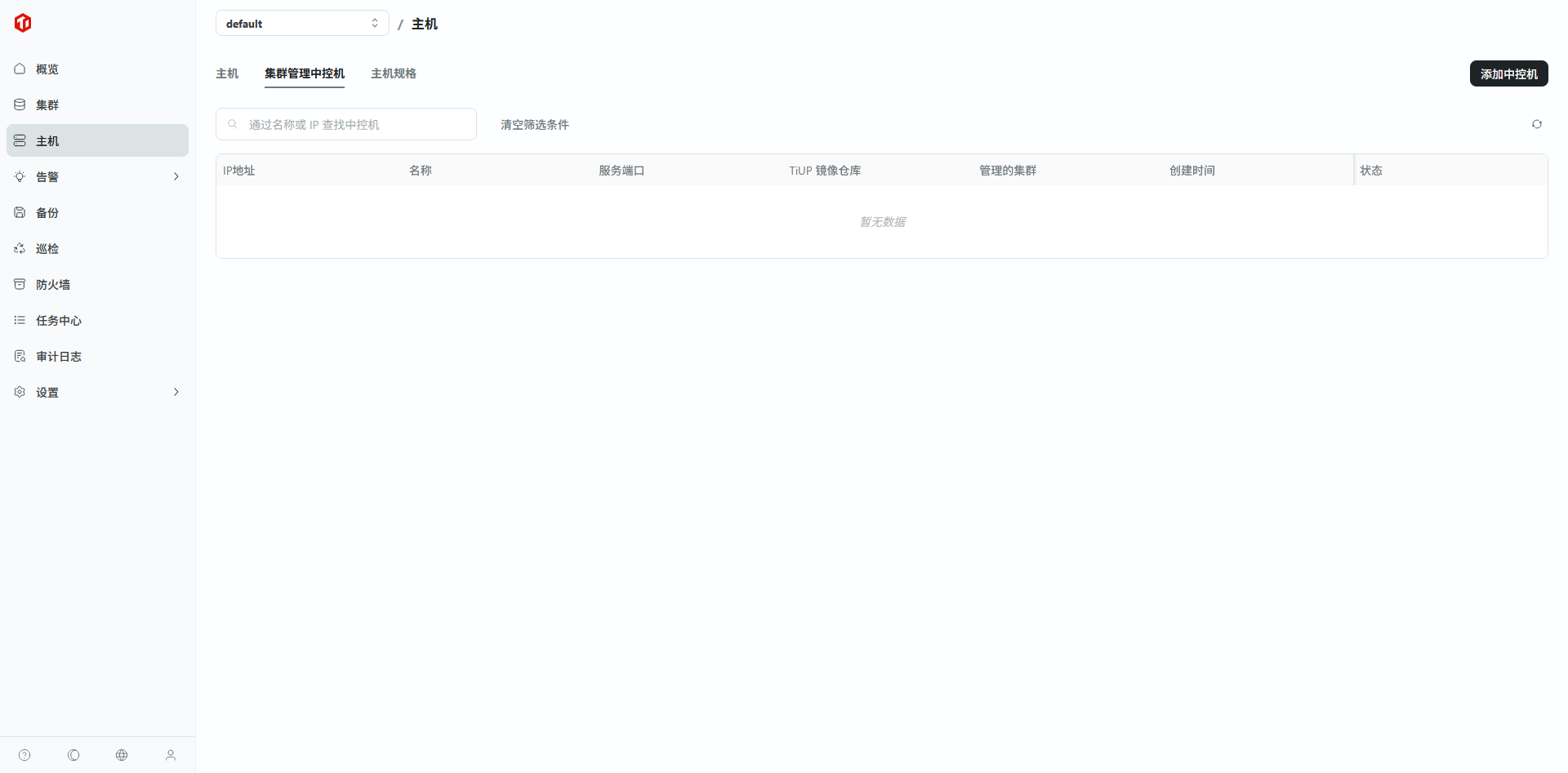 step 2.填写中控机信息 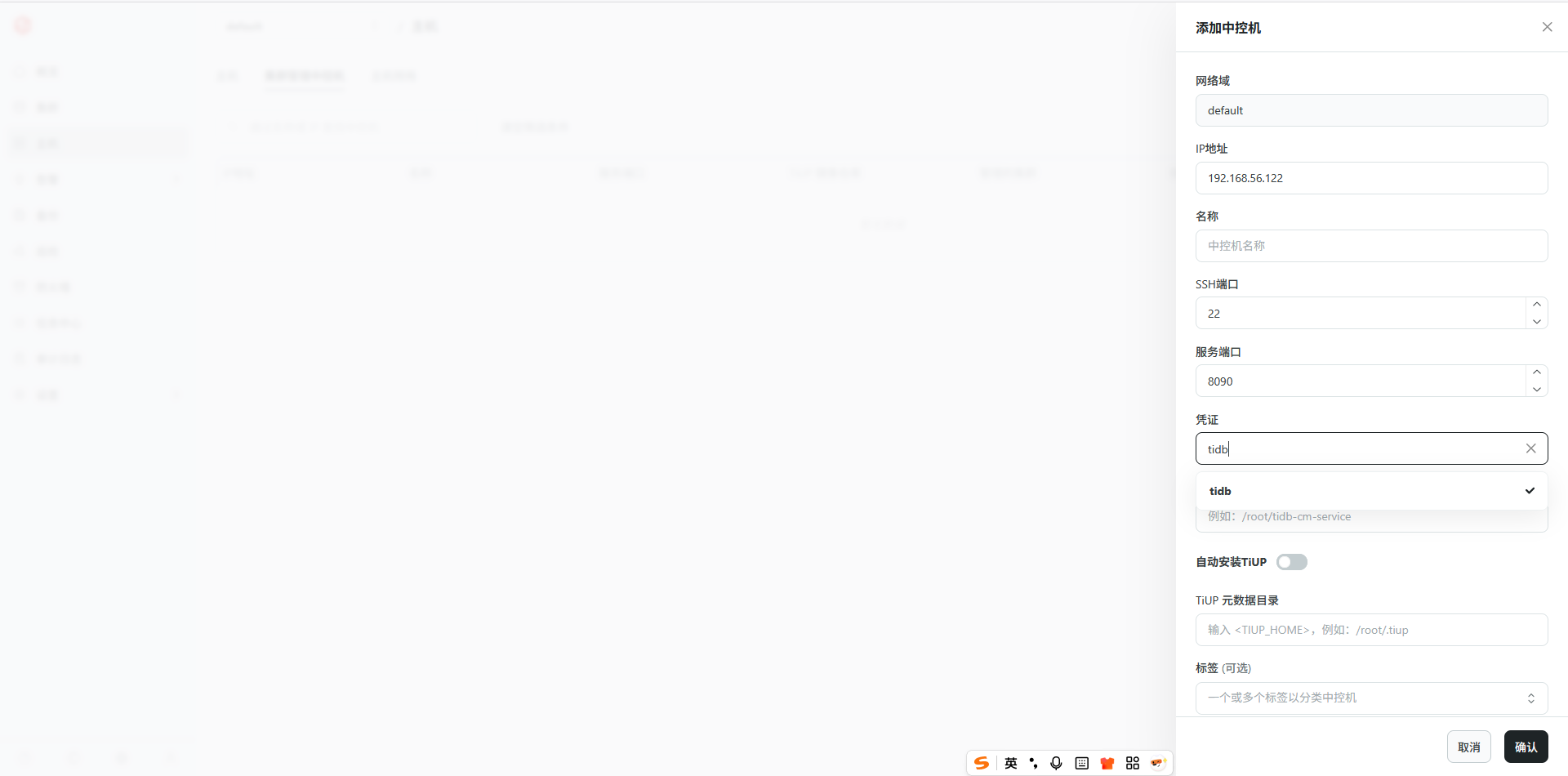 ◦ IP 地址:中控机 IP ◦ 名称:自定义 ◦ SSH 端口:中控机 SSH 端口,默认 22,若有冲突可修改 ◦ 服务端口:中控机被控后提供服务的端口,默认 9090,若有冲突可修改 ◦ 凭证:上一个步骤中添加的 SSH 登录凭证 ◦ 服务根目录:中控机被控后提供服务进程的安装目录,默认值: /root/tidb-cm-service ◦ 自动安装 TiUP:建议安装 ◦ TiUP 镜像仓库:这里指定 TEM 使用的组件来源,仓库类型选 TEM 镜像仓库,在“设置 -> 组件管理 -> 设置仓库地址”可以拿到仓库地址(注意:一旦在此处设置了自定义的仓库地址,则“创建中控机 -> TiUP 镜像仓库 -> TEM 镜像仓库”选项对应的地址是“自定义的仓库地址”而不是“默认的仓库地址”。因此,如果默认的仓库地址可以使用,则不需要设置自定义的仓库地址,如果设置了,则要确保自定义的地址也是可连通的。) ◦ TiUP 源数据库目录::指定 TiUP 元数据安装的目录,默认值: /root/.tiup ◦ 标签:可选 点击主机地址,可以查看配置详情 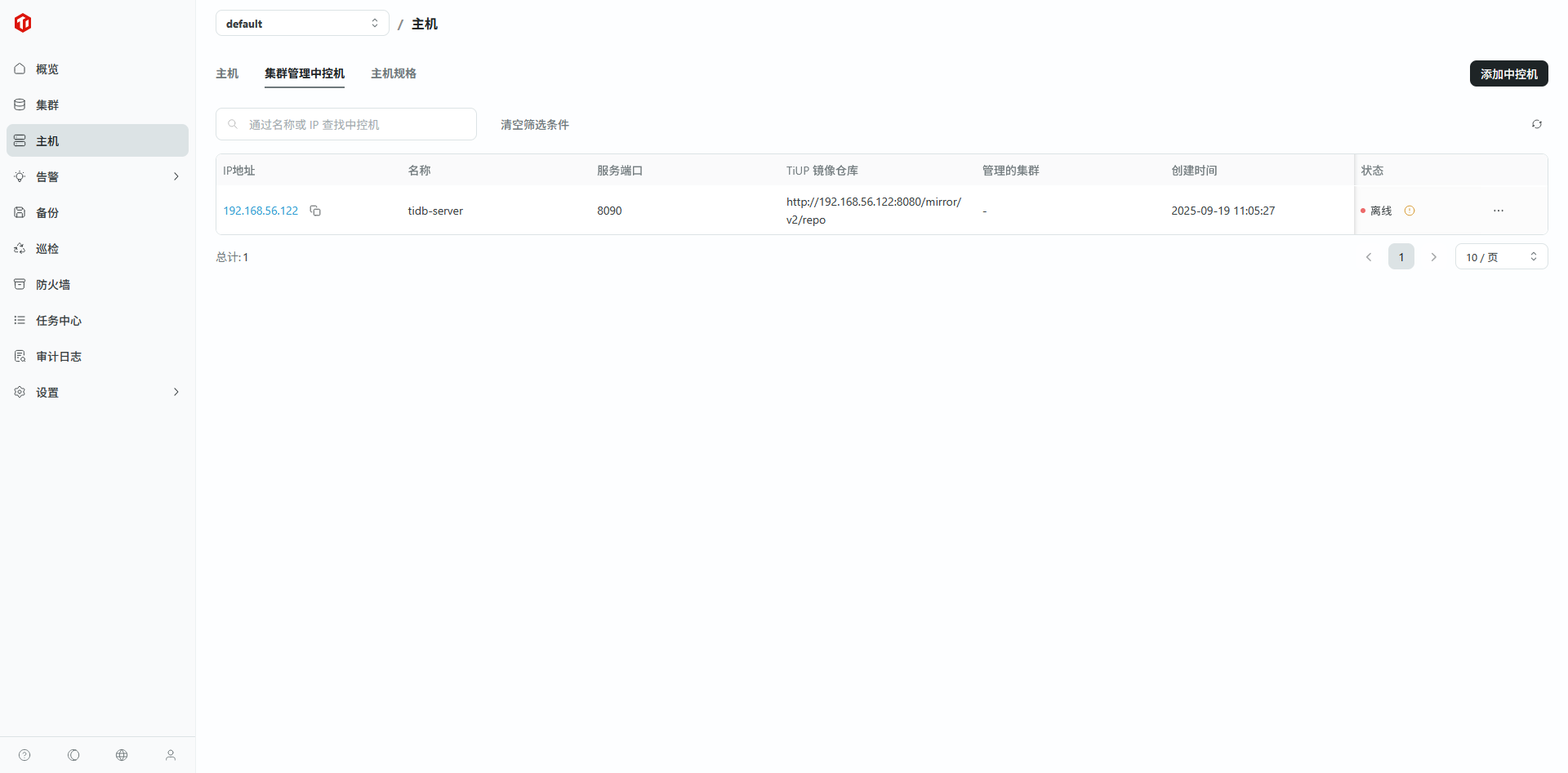 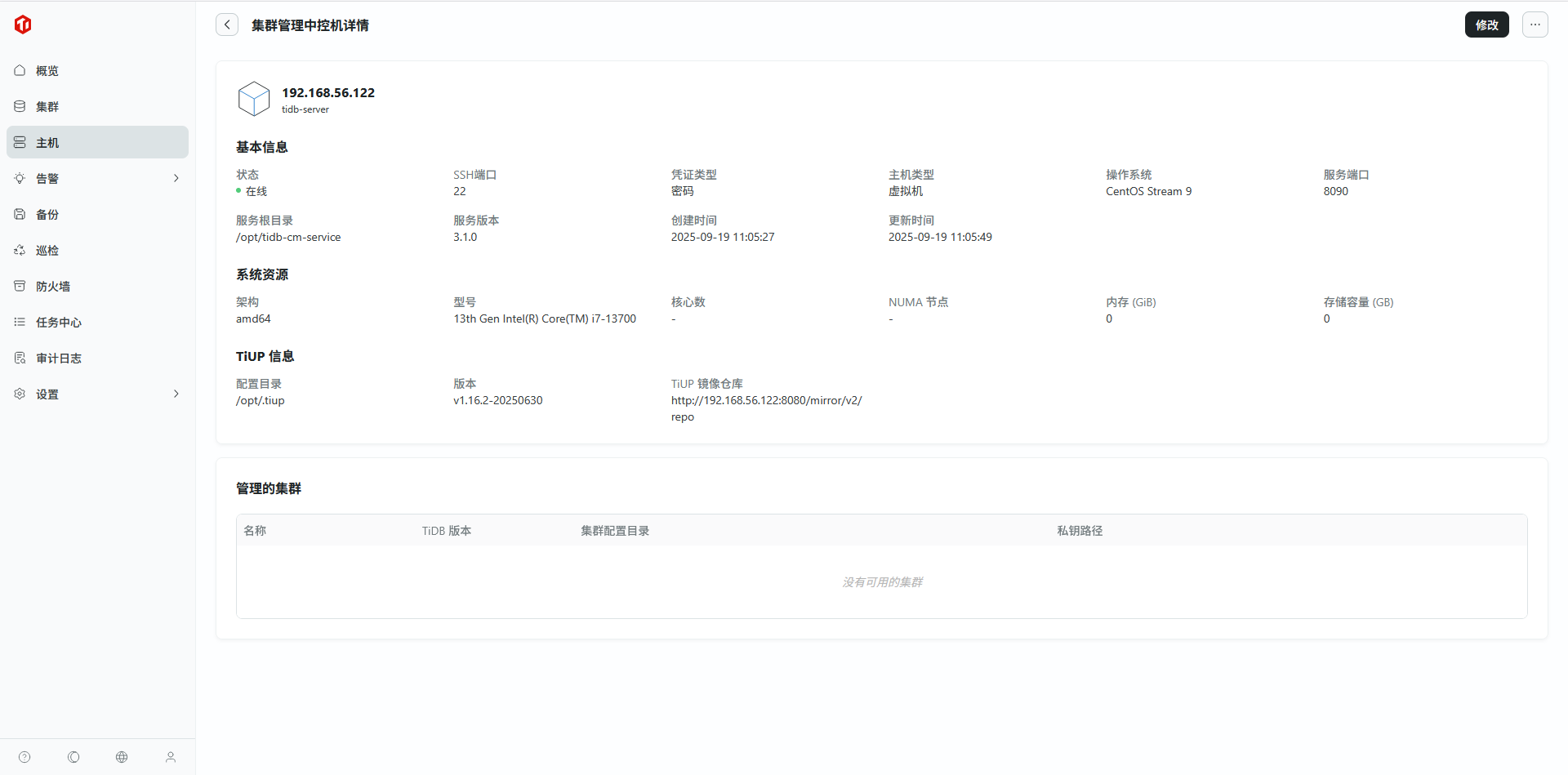 ## 2.4. 配置集群主机 step 1.点击“主机 -> 主机 -> 添加共享主机” 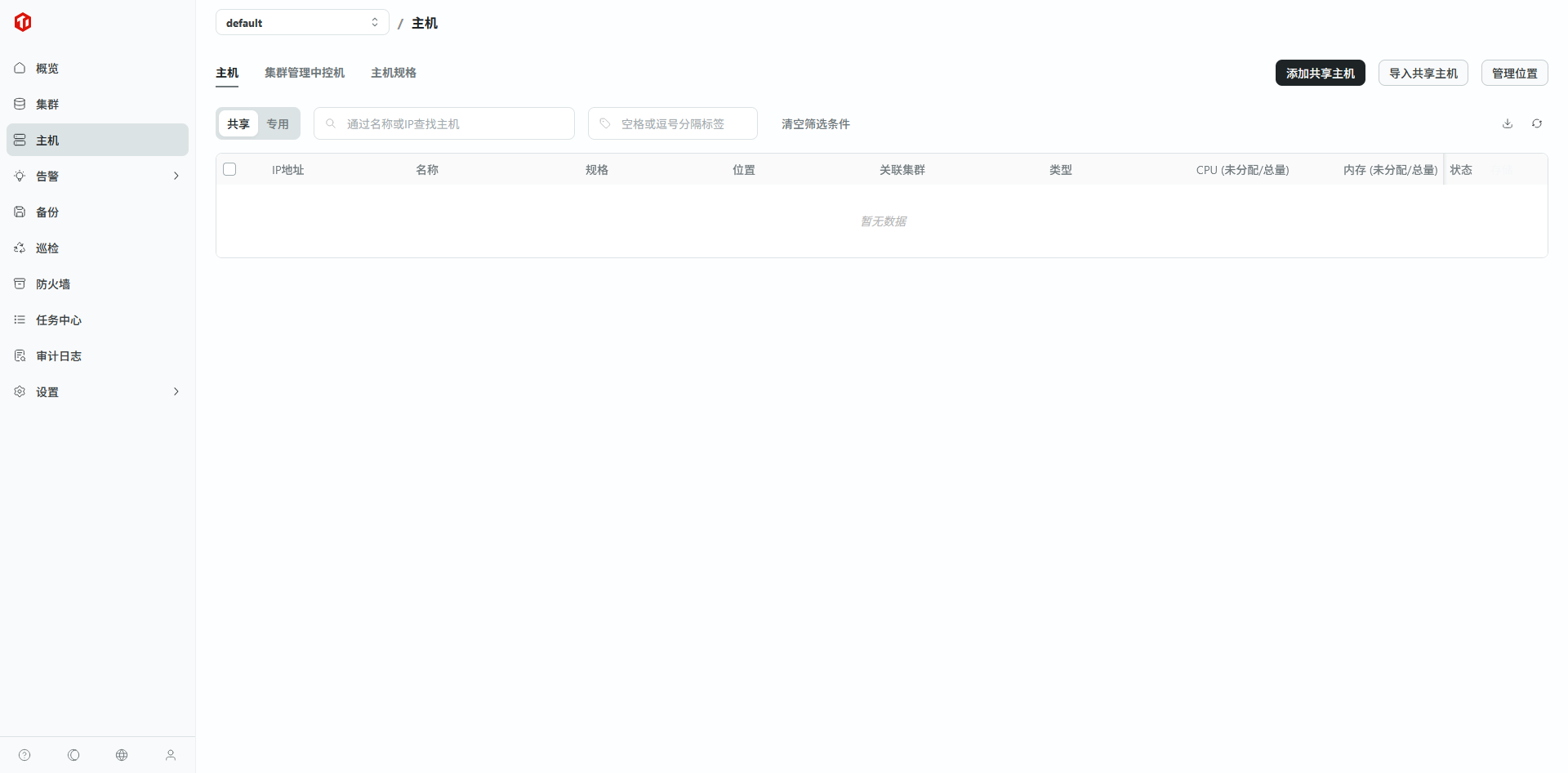 step 2.填写主机信息,点击“预览”,预览无误后点击“确认添加” 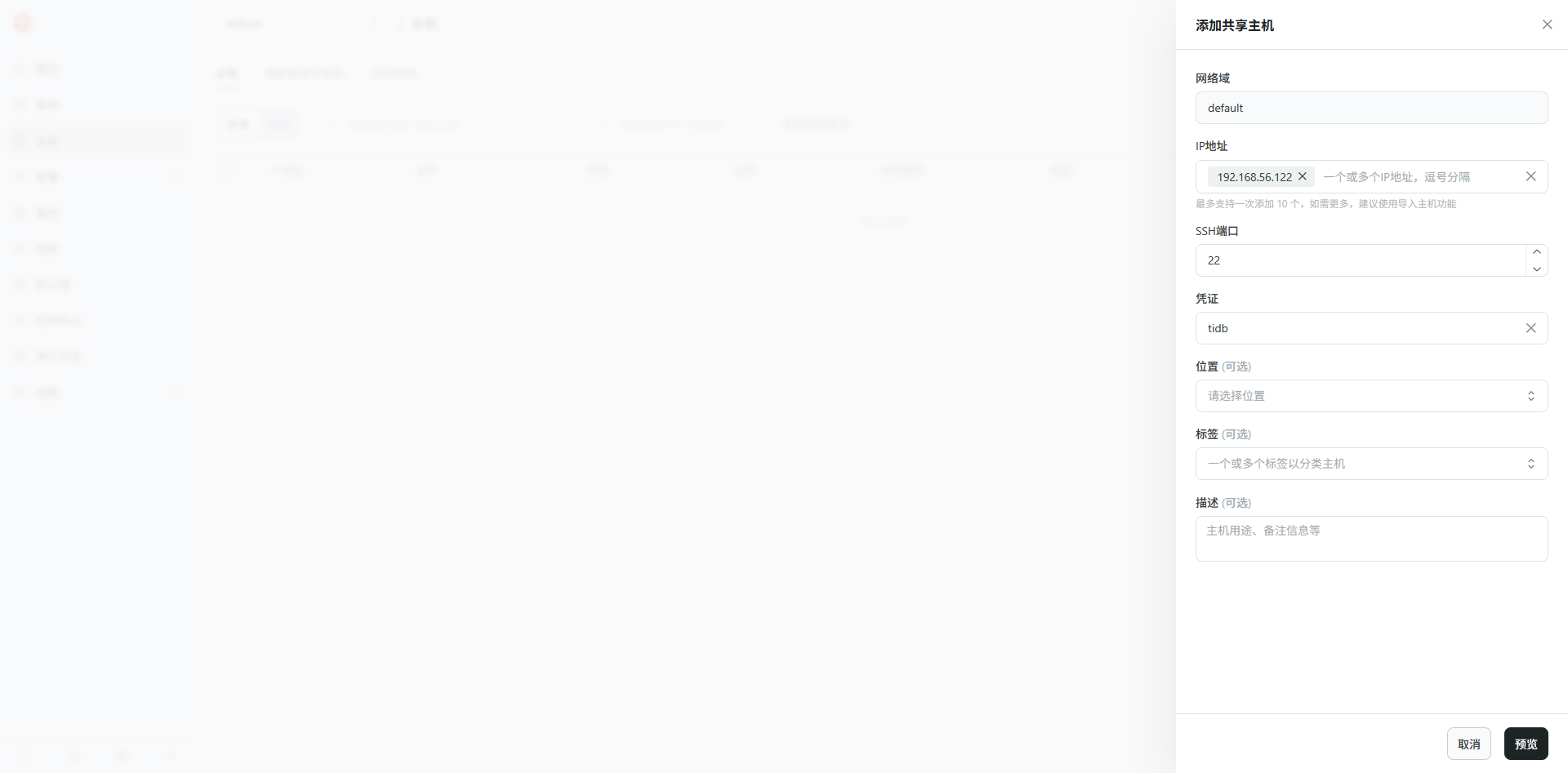 ◦ IP 地址:主机 IP ◦ SSH 端口:中控机 SSH 端口 ◦ 凭证:之前步骤添加的 SSH 登录凭证 step 3.点击主机地址,可以查看配置详情 ## 2.5. 创建集群 step 1.点击“集群 -> 创建集群” 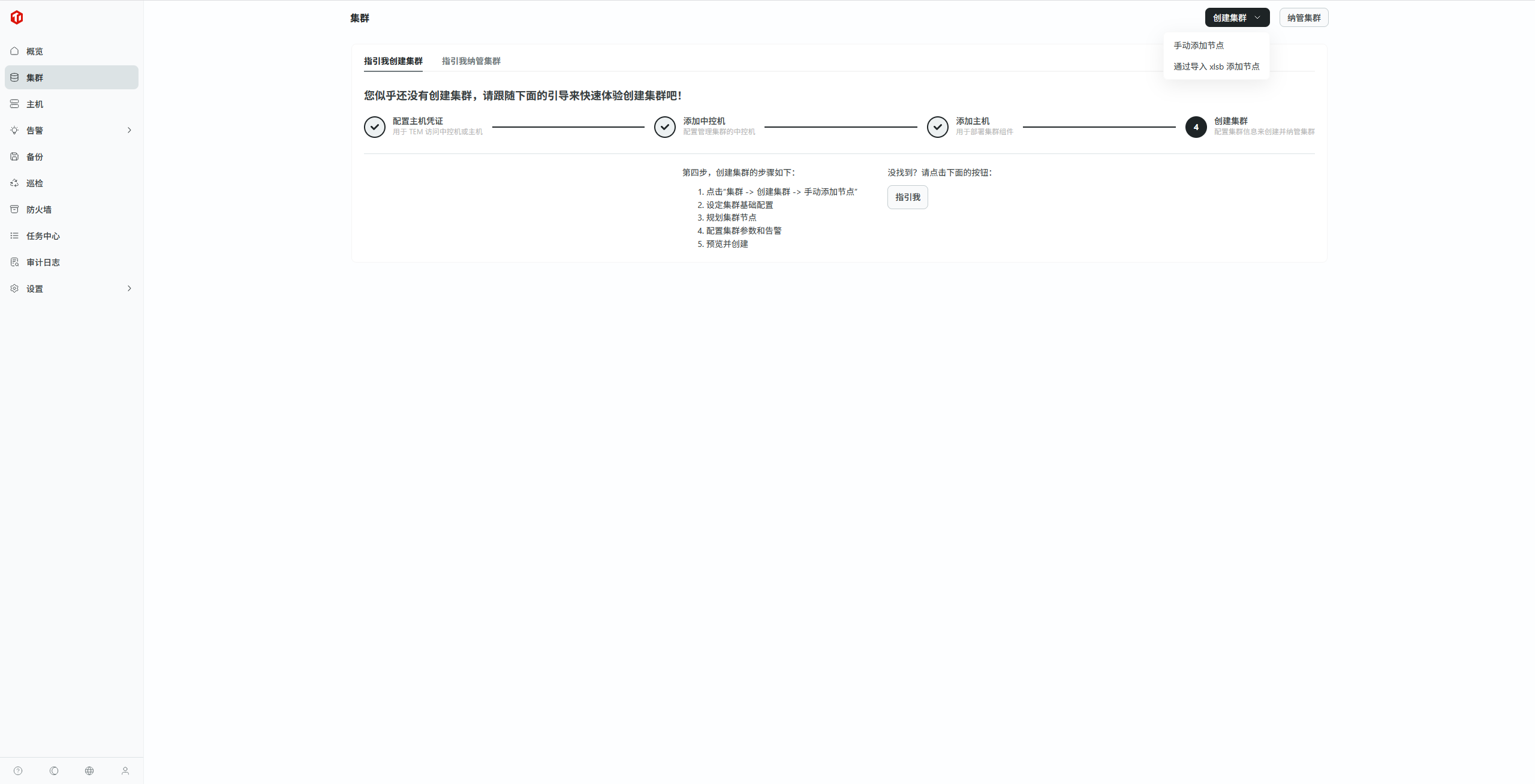 - 手工添加 - 通过导入xlsb添加节点 step 2.设定集群基础配置 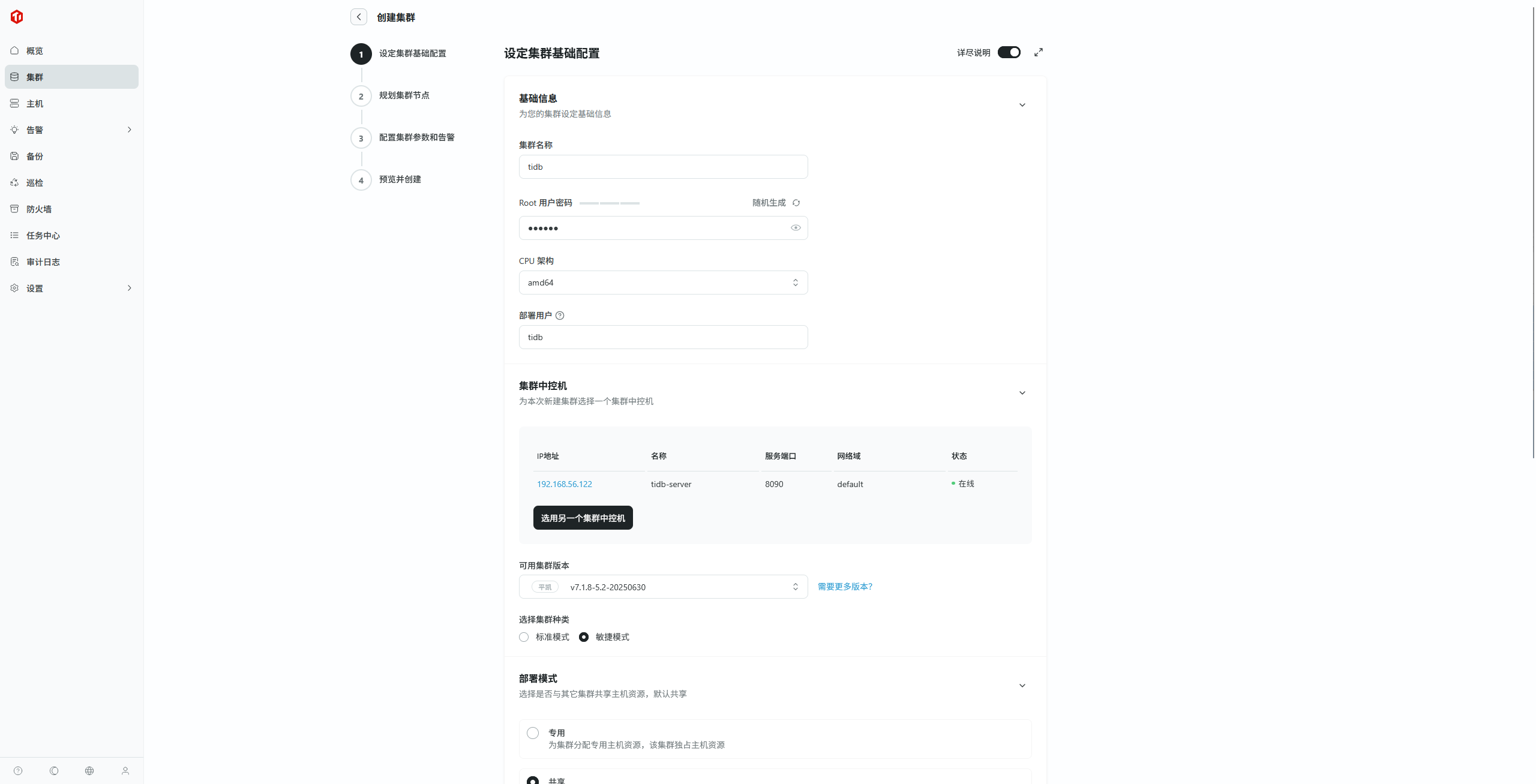 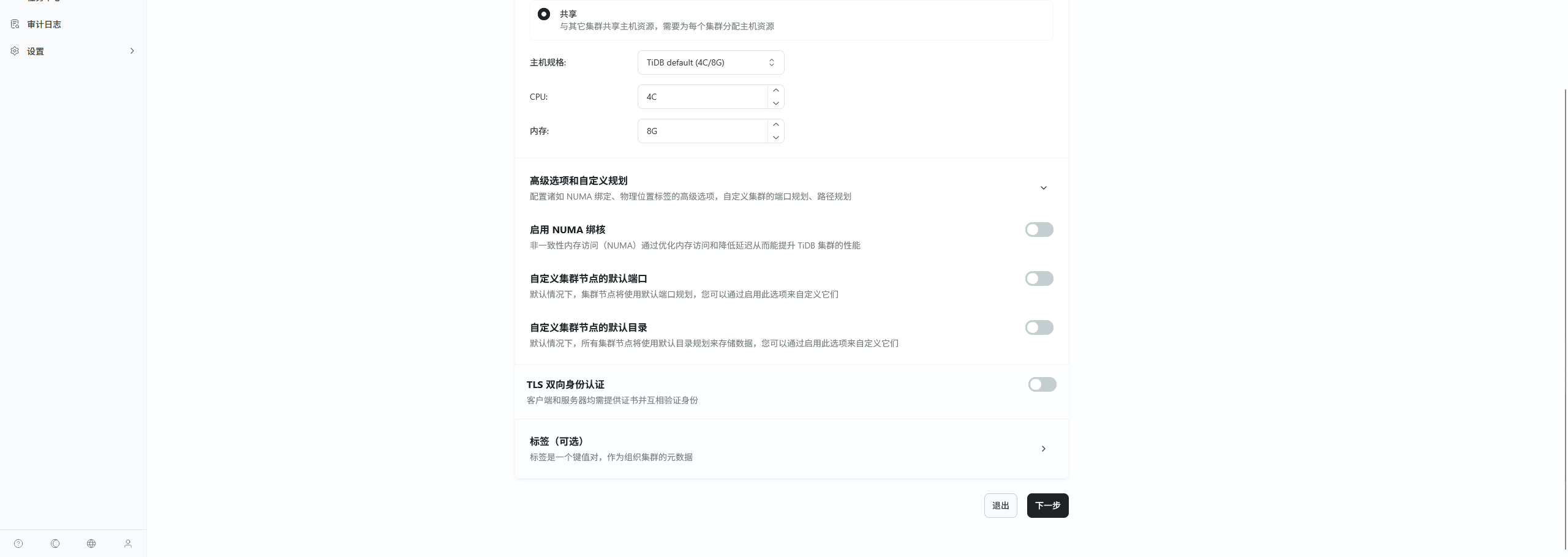 a. 填写集群基础信息 - 集群名称:自定义 - Root 用户密码:该集群的数据库 Root 用户密码,后续会在集群内的“ SQL 编辑器”和“数据闪回”功能中用到,记得保存 - CPU 架构:选择部署机器的芯片架构 - 部署用户:用于启动部署的集群的用户,若该字段指定的用户在目标机器上不存在,则会尝试自动创建 b. 选择集群中控机 - 为本次新建集群选择一个集群中控机 - 可用集群版本:这里下拉框中的可选项取决于该中控机的镜像地址中包含的版本包,若在“组件管理”功能中为其配置了固定的资源包,则需要将“组件管理”的镜像仓库地址更新到中控机的信息中,否则默认新建的中控机的镜像地址指向平凯开源的镜像仓库。(组件管理镜像仓库地址获取方法见“第三步:配置中控机)”。 c. 选择部署模式 - 根据需求选择部署模式为“专用”或“共享”,并选择主机规格。 - 主机规格,默认 TiDBX , TiDB两种规则 d. 其余选项默认配置即可,点击下一步 step 3.规划集群节点 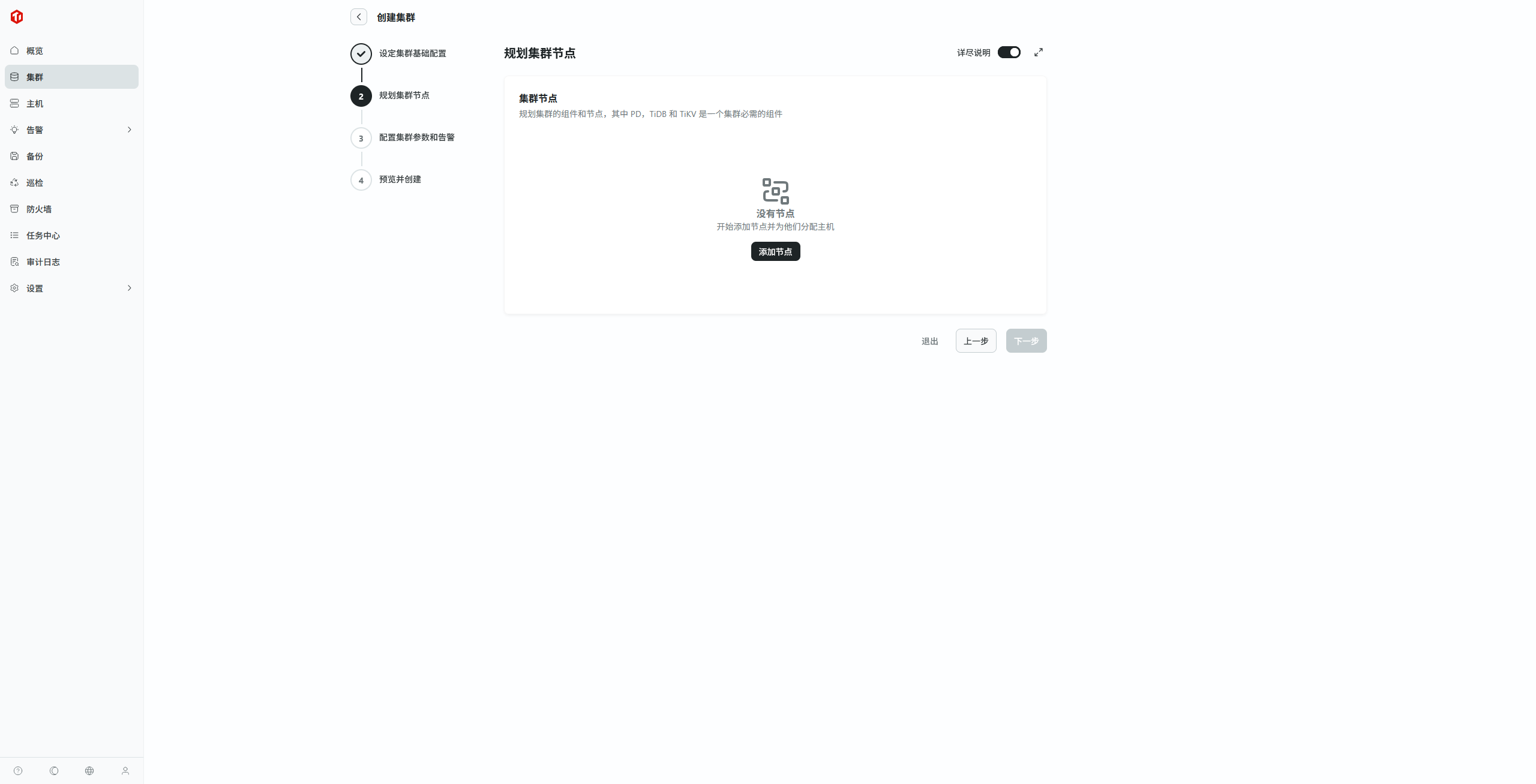 点击添加节点,进行具体规划,点击下一步 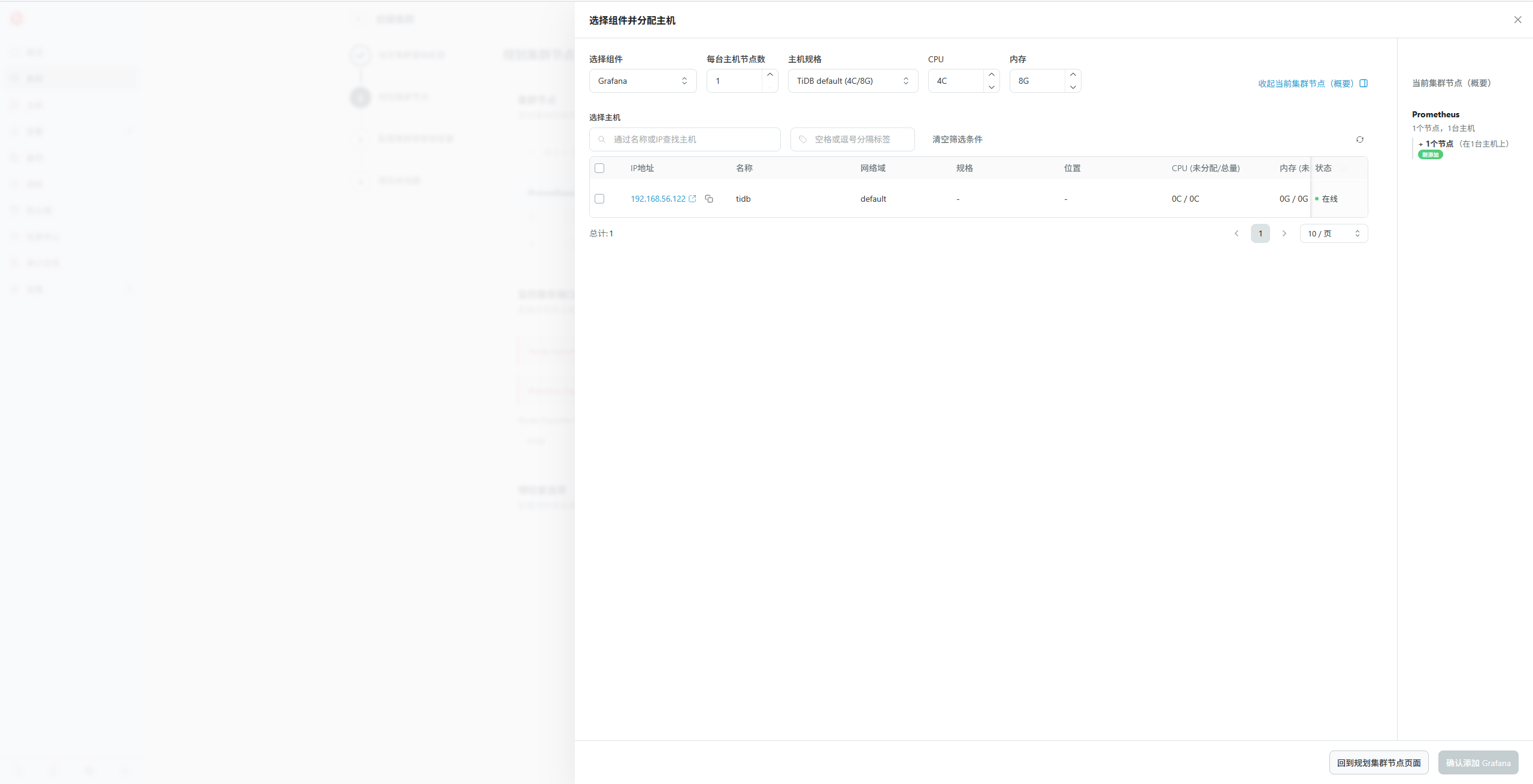 a. 选择组件和要部署的主机后,点击确定,进行下一个组件的添加 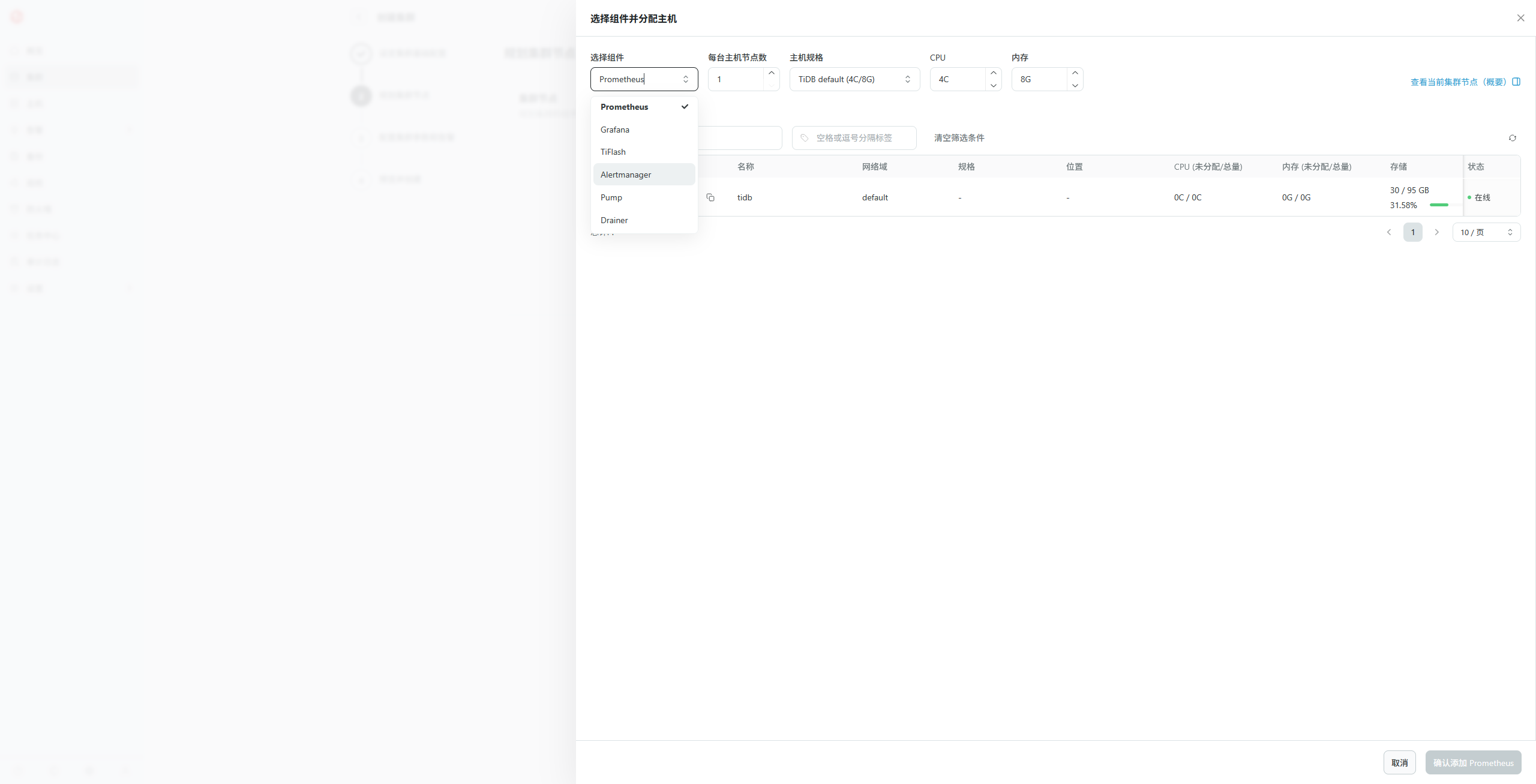 > tem部署敏捷模式需要的组件: > > - PingKaiDB Fusion:必须添加(节点配额限制为 10),敏捷模式即包含 PD,TiDB 和 TiKV > - Grafana:必须添加(才能使用监控功能) > - Prometheus 以及 Alertmanager:必须添加(才能使用告警功能) > - TiFlash:可选(如果需要测试平凯数据库敏捷模式的 HTAP 功能,需要添加) > - Pump 和 Drainer 组件:不建议添加 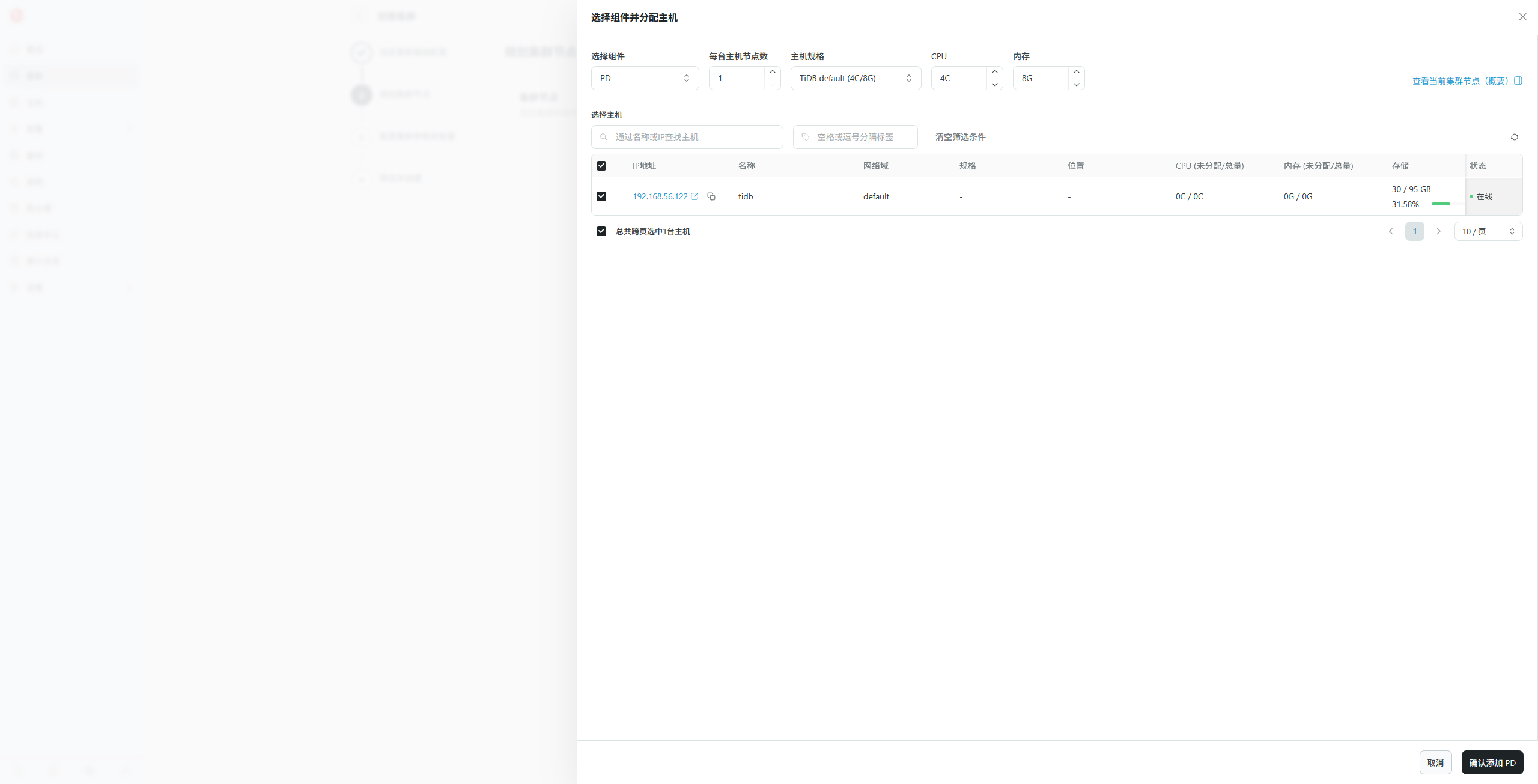 依次添加多个角色,返回点击“回到规划集群节点页面”;每次添加一个加色,“回到规划集群节点页面”查看集群角色详情。 集群角色的维度查看集群规划: 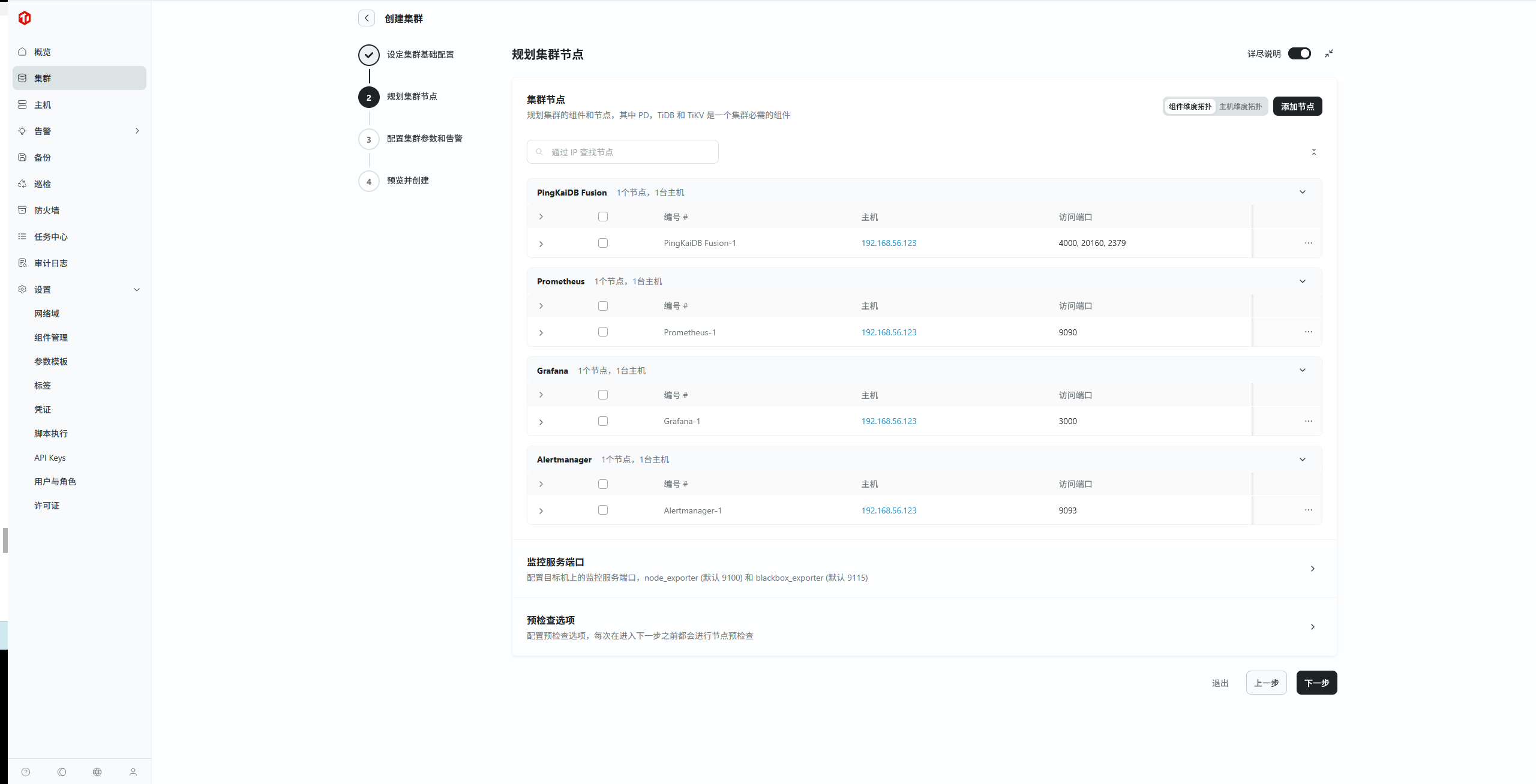 主机角色的维度查看集群规划: 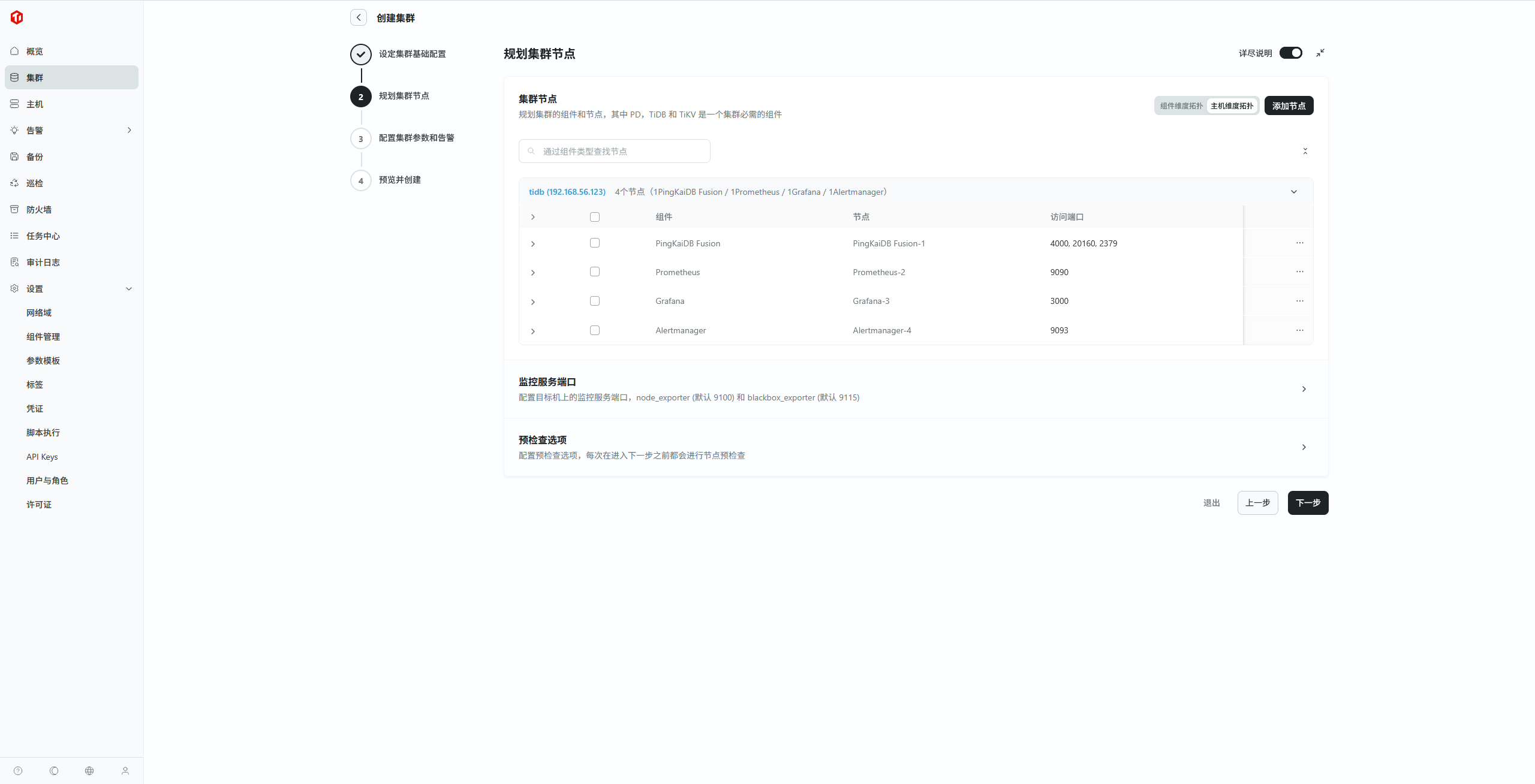 b. 当添加完需要的组件后,点击“回到规划集群节点页面”按钮 c. 点击“下一步”按钮,预检查节点配置中,进行集群节点的配置修改和预检查 如果检查时出现端口冲突的问题, 请将端口号修改为一个未使用过的;一般情况下,端口和目录的名称是保持一致的,但如果只改了端口没有改目录,则会出现“目录已存在”的警告,若想覆盖该目录中的数据,则可勾选下面的“预检查选项”。 step 4.配置集群参数和告警 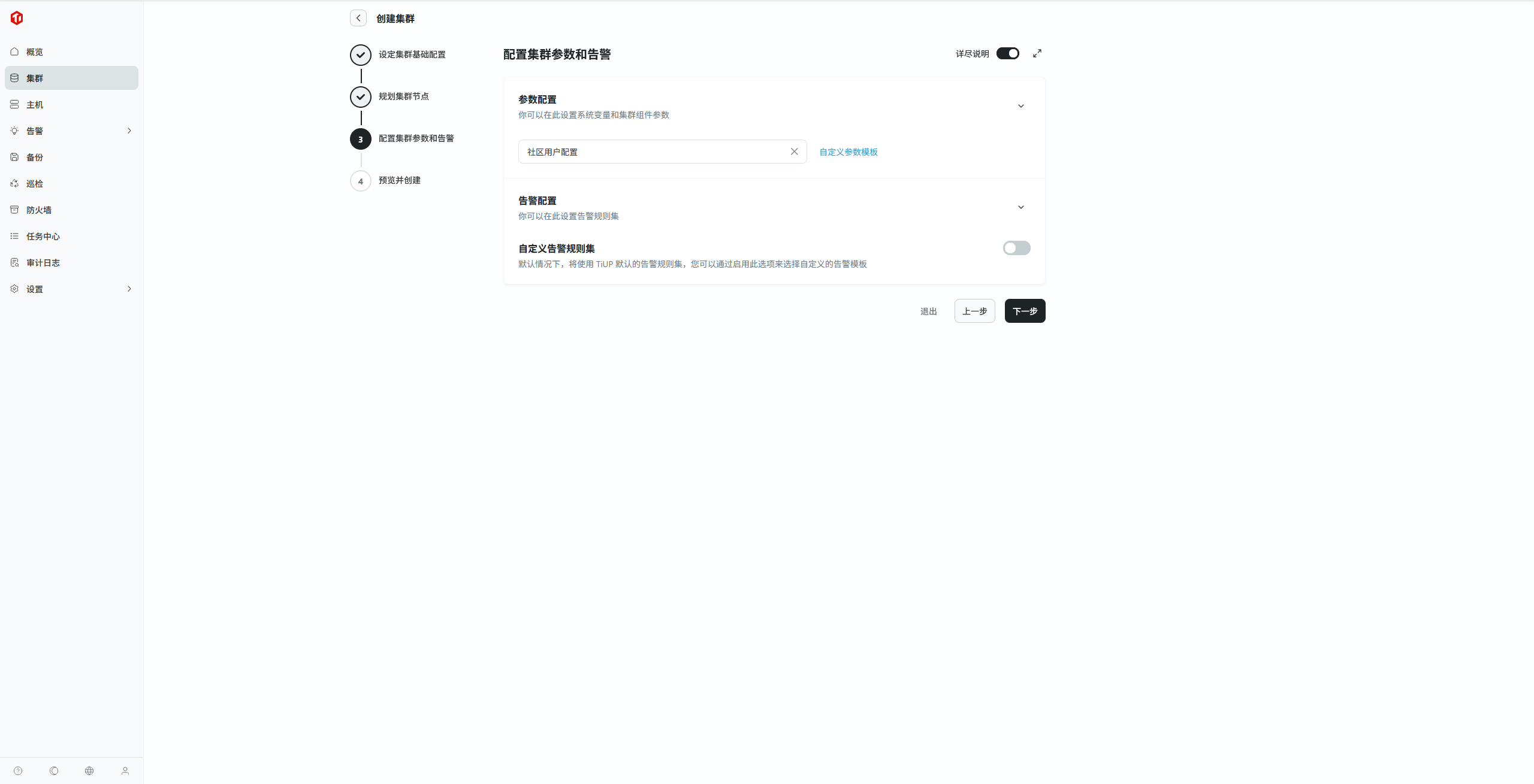 默认参数模版和告警模版即可,点击下一步 step 5.预览创建配置,确认无误后点击“创建”按钮启动创建任务 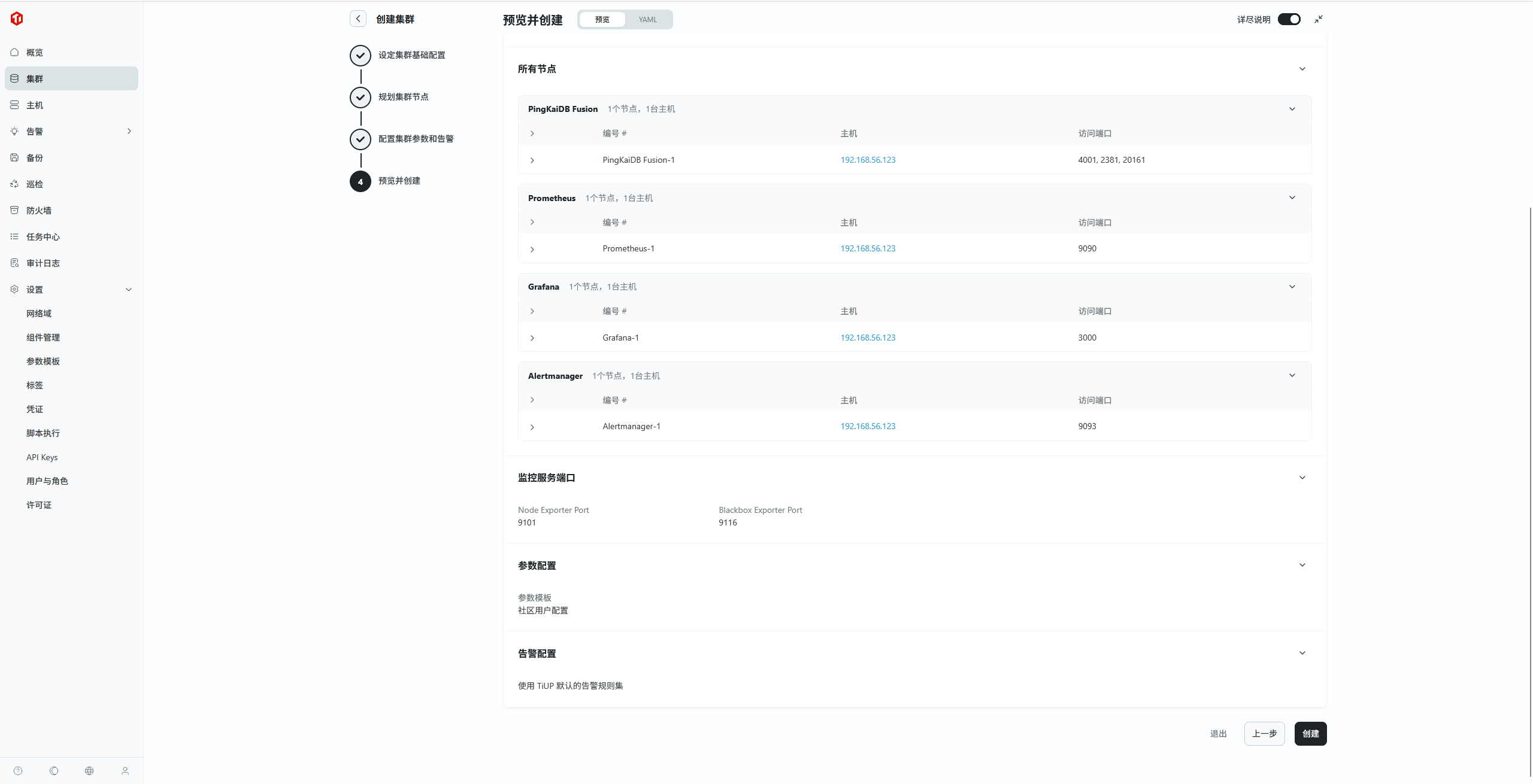) 可以预览 YAML 格式的集群配置: 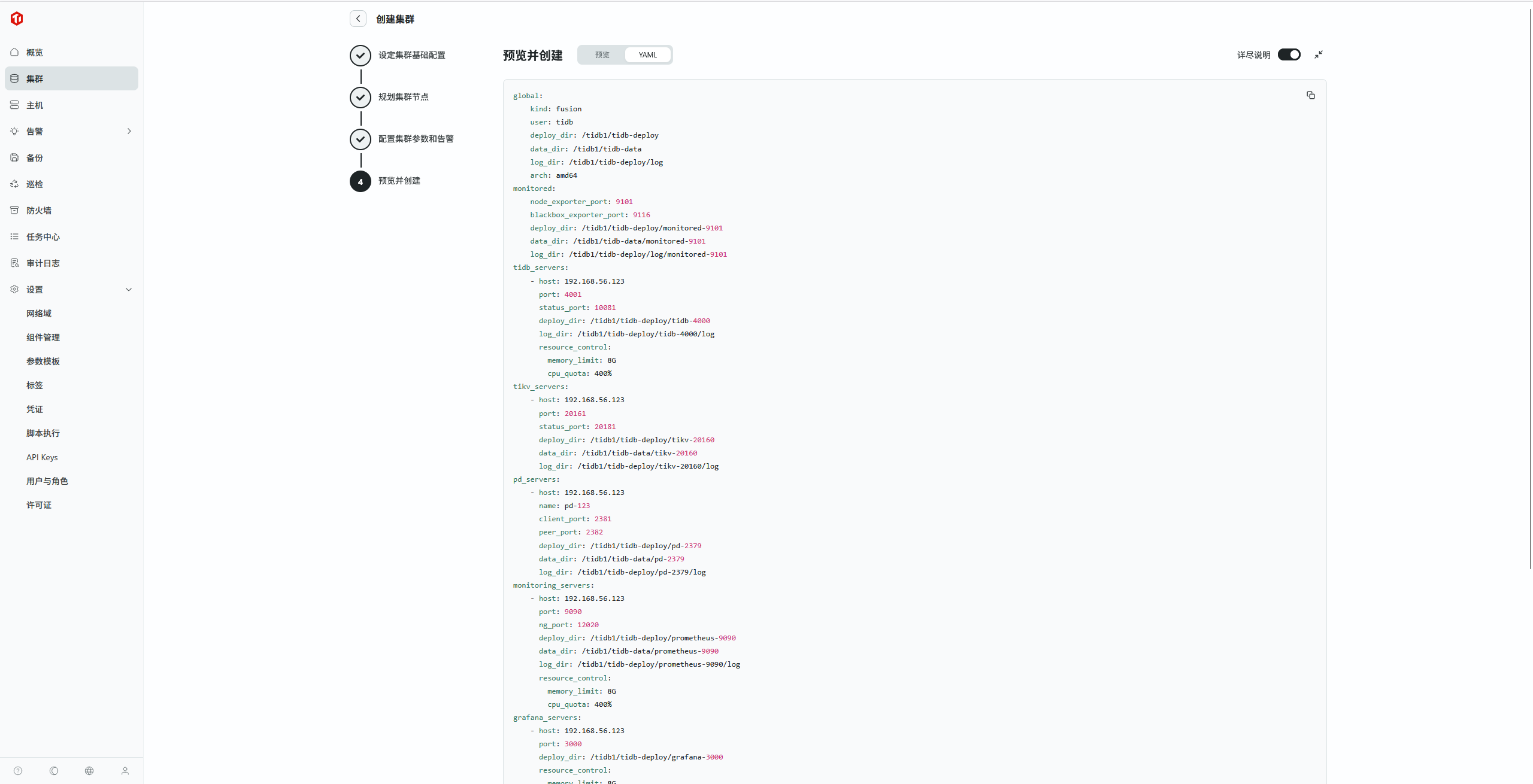  step 6.创建过程的具体日志可点击“查看详情”会跳转到 “任务中心”,或在“任务中心”中点击相应的任务进行查看 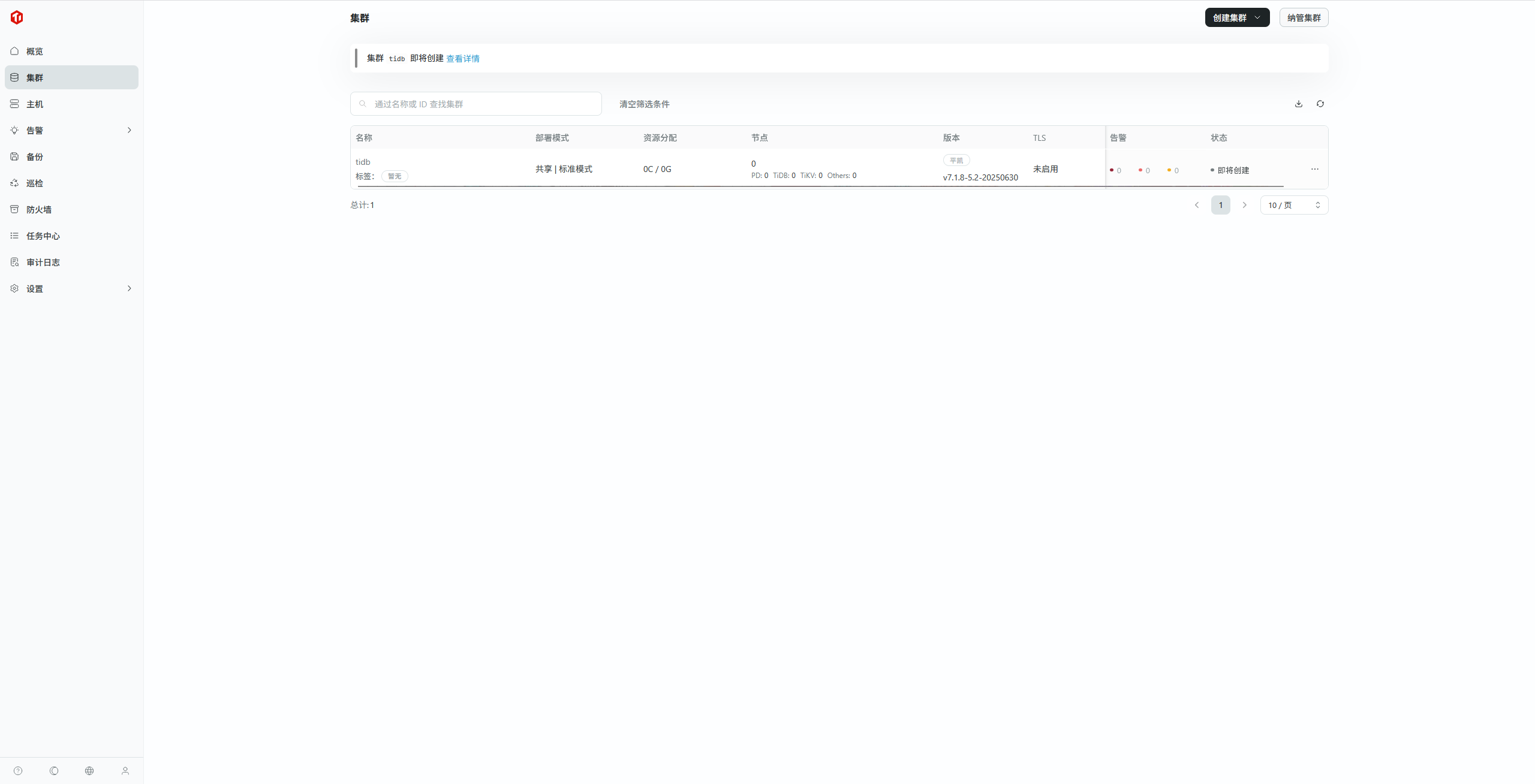 step 7.集群创建并纳管成功 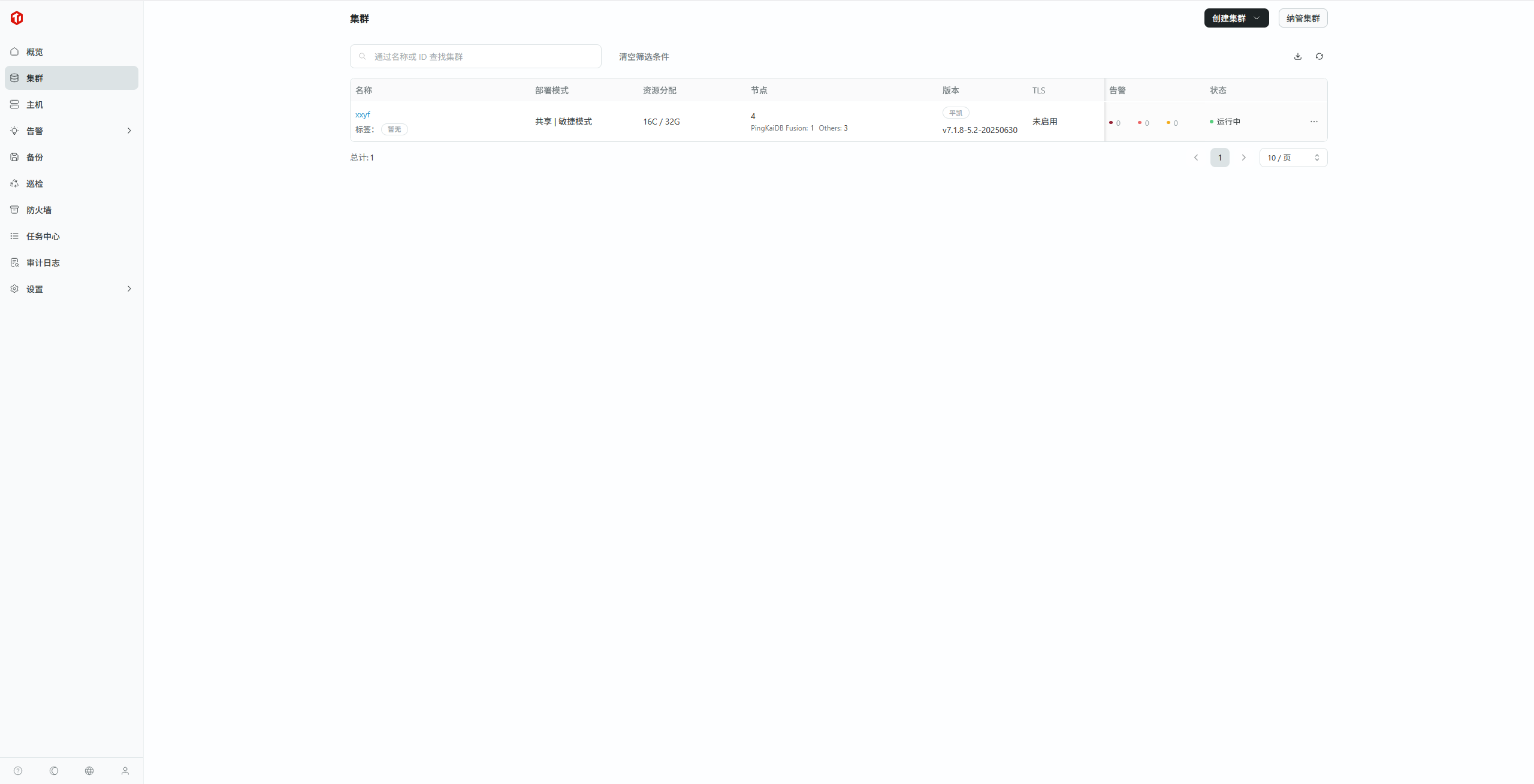 点击集群名称 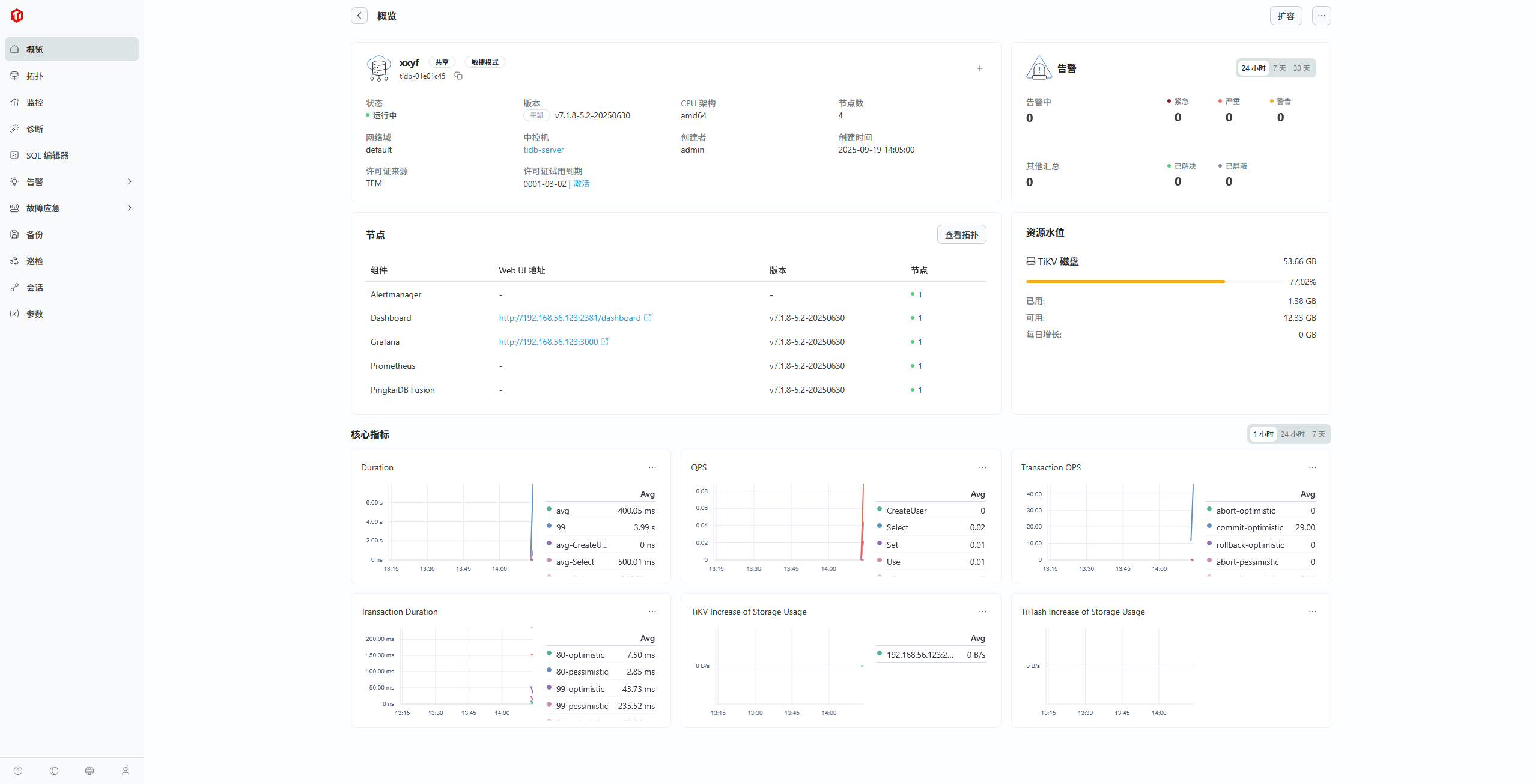 | 页面 | 地址 | 用户 | 密码 | | --------- | ------------------------------------ | ----- | ----------- | | Dashboard | http://192.168.56.123:2381/dashboard | root | Admin@123! | | Grafana | http://192.168.56.123:3000 | admin | admin | | TEM SQL | | root | Admin@123! | Tidb Dashboard  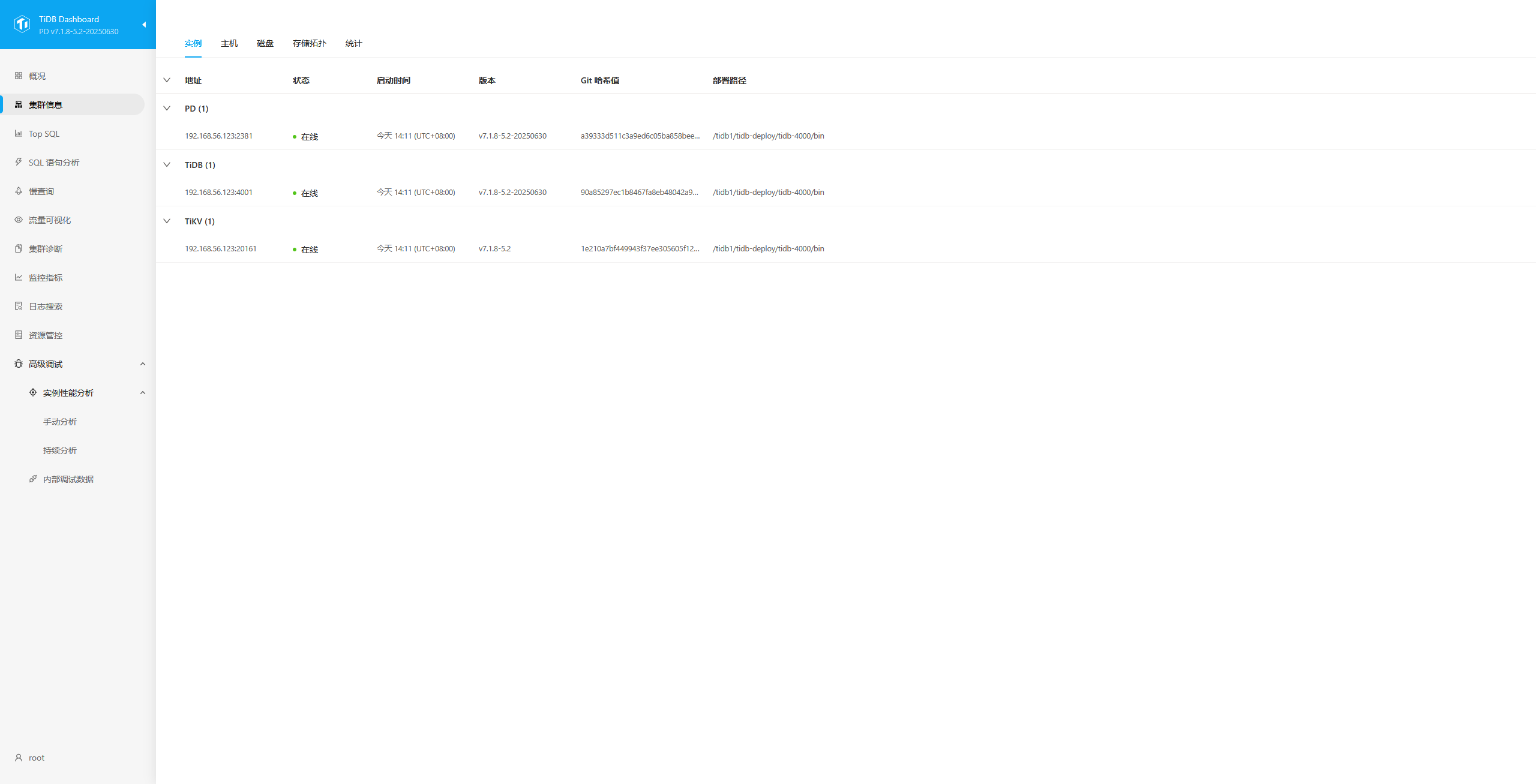 Grafana 已经导入了监控模版 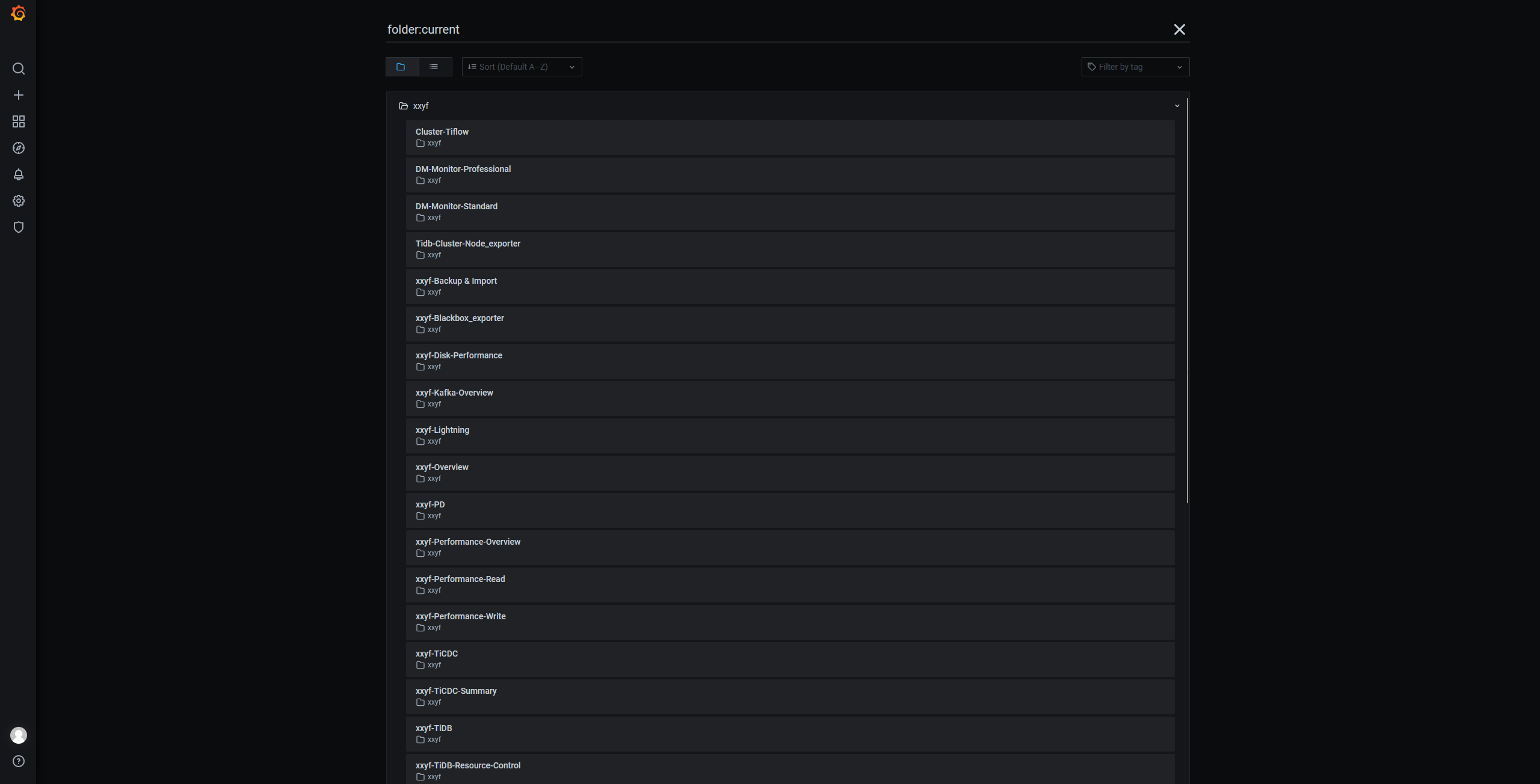 ## 2.6.配置敏捷模式全局变量(建议) 完成平凯数据库敏捷模式部署后,在 TEM SQL 编辑器或使用 MySQL 客户端连接平凯数据库敏捷模式 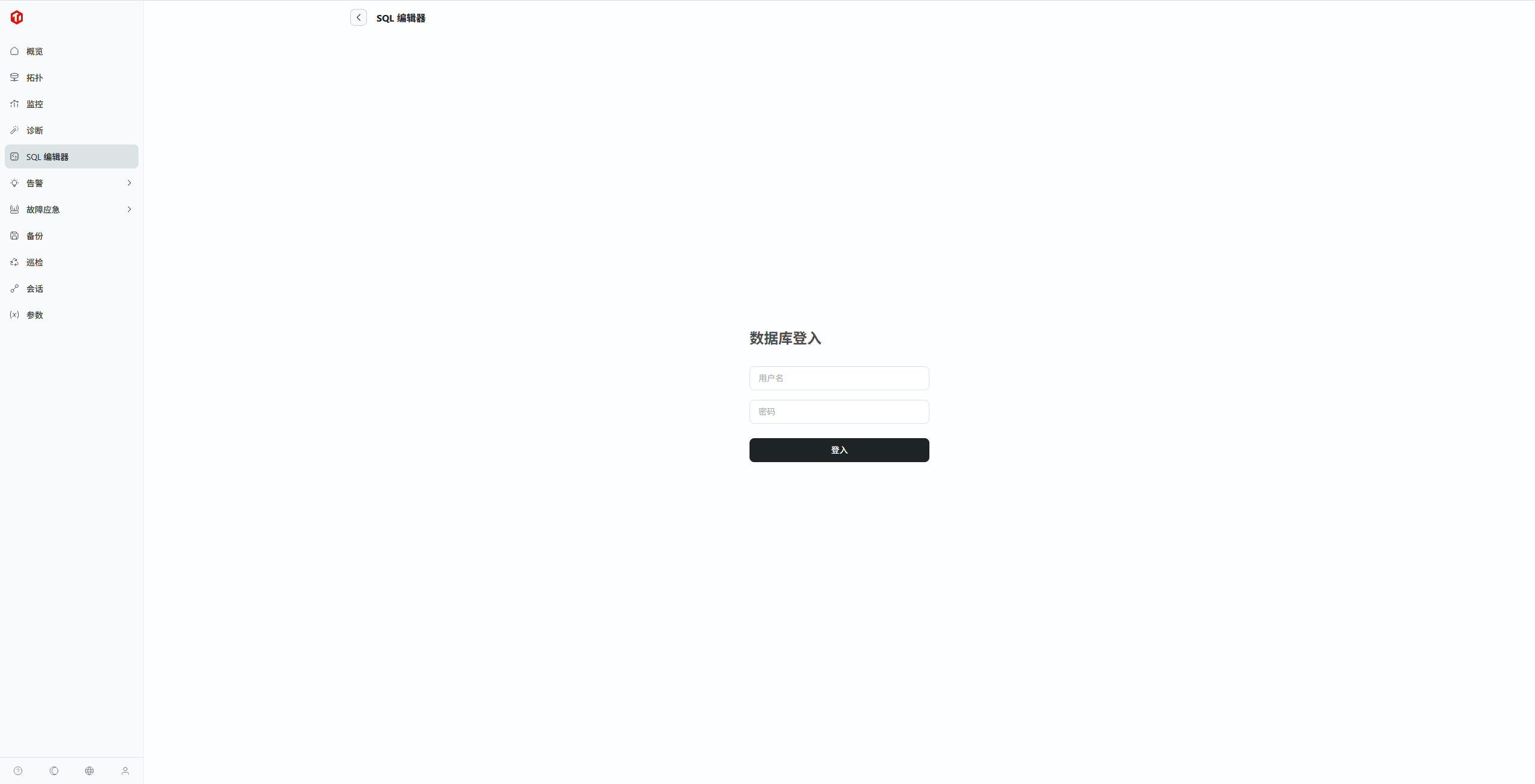 输入以下命令: 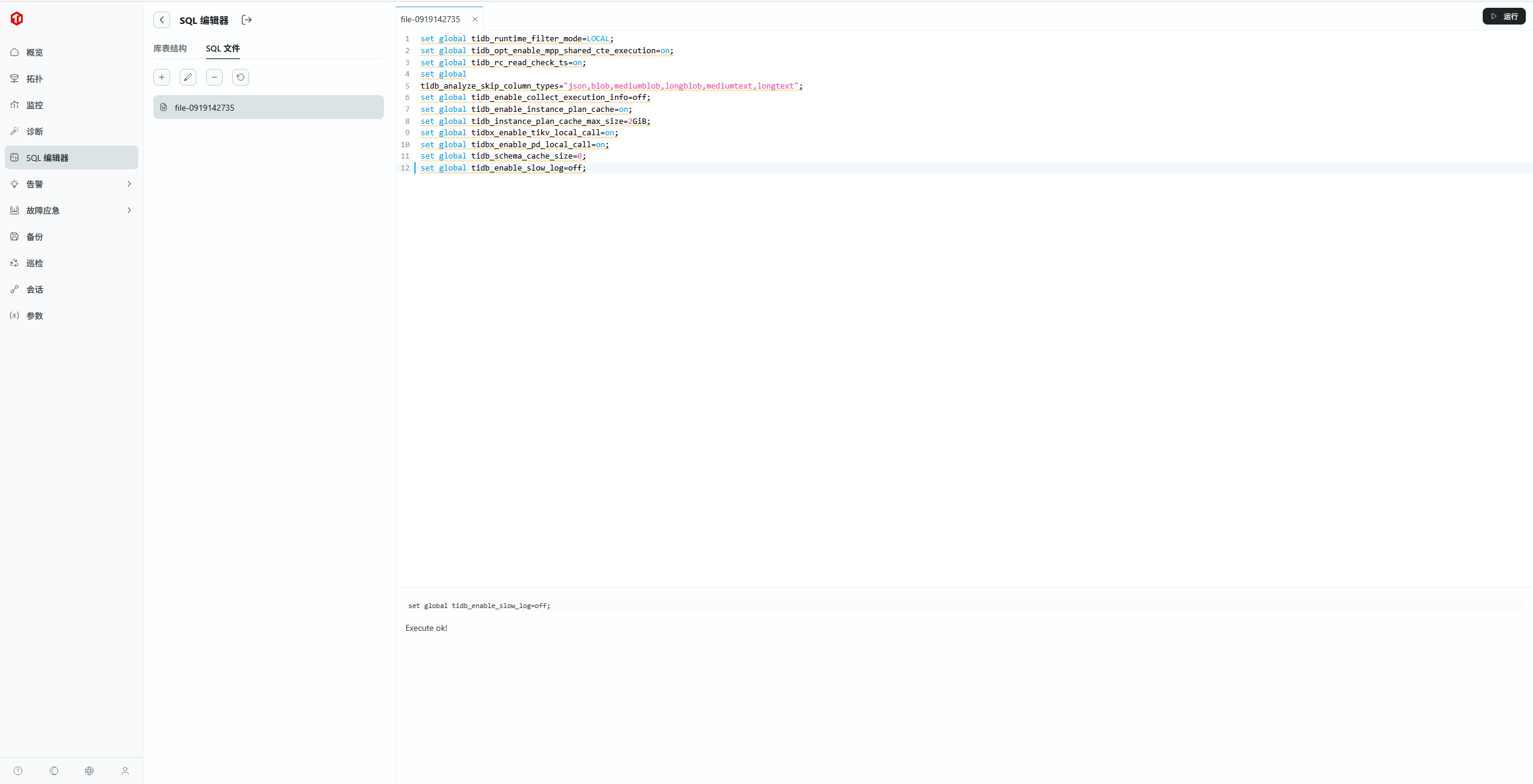 ``` set global tidb_runtime_filter_mode=LOCAL; set global tidb_opt_enable_mpp_shared_cte_execution=on; set global tidb_rc_read_check_ts=on; set global tidb_analyze_skip_column_types="json,blob,mediumblob,longblob,mediumtext,longtext"; set global tidb_enable_collect_execution_info=off; set global tidb_enable_instance_plan_cache=on; set global tidb_instance_plan_cache_max_size=2GiB; set global tidbx_enable_tikv_local_call=on; set global tidbx_enable_pd_local_call=on; set global tidb_schema_cache_size=0; -- 是否持久化到集群:否,仅作用于当前连接的 TiDB 实例 set global tidb_enable_slow_log=off; ``` 集群创建完毕! ## 2.7. 进程及端口 tidb 敏捷模式的进程: ``` [root@localhost tem-package-v3.1.0-linux-amd64]# ps -ef UID PID PPID C STIME TTY TIME CMD root 1 0 0 00:34 ? 00:00:17 /usr/lib/systemd/systemd --switched-root --system --deserialize 22 root 2 0 0 00:34 ? 00:00:00 [kthreadd] root 4 2 0 00:34 ? 00:00:00 [kworker/0:0H] root 5 2 0 00:34 ? 00:00:01 [kworker/u8:0] root 6 2 2 00:34 ? 00:02:27 [ksoftirqd/0] root 7 2 0 00:34 ? 00:00:00 [migration/0] root 8 2 0 00:34 ? 00:00:00 [rcu_bh] root 9 2 0 00:34 ? 00:01:04 [rcu_sched] root 10 2 0 00:34 ? 00:00:00 [lru-add-drain] root 11 2 0 00:34 ? 00:00:00 [watchdog/0] root 12 2 0 00:34 ? 00:00:00 [watchdog/1] root 13 2 0 00:34 ? 00:00:00 [migration/1] root 14 2 0 00:34 ? 00:00:37 [ksoftirqd/1] root 16 2 0 00:34 ? 00:00:00 [kworker/1:0H] root 17 2 0 00:34 ? 00:00:00 [watchdog/2] root 18 2 0 00:34 ? 00:00:00 [migration/2] root 19 2 0 00:34 ? 00:00:36 [ksoftirqd/2] root 21 2 0 00:34 ? 00:00:00 [kworker/2:0H] root 22 2 0 00:34 ? 00:00:01 [watchdog/3] root 23 2 0 00:34 ? 00:00:04 [migration/3] root 24 2 0 00:34 ? 00:01:03 [ksoftirqd/3] root 26 2 0 00:34 ? 00:00:00 [kworker/3:0H] root 28 2 0 00:34 ? 00:00:00 [kdevtmpfs] root 29 2 0 00:34 ? 00:00:00 [netns] root 30 2 0 00:34 ? 00:00:00 [khungtaskd] root 31 2 0 00:34 ? 00:00:00 [writeback] root 32 2 0 00:34 ? 00:00:00 [kintegrityd] root 33 2 0 00:34 ? 00:00:00 [bioset] root 34 2 0 00:34 ? 00:00:00 [bioset] root 35 2 0 00:34 ? 00:00:00 [bioset] root 36 2 0 00:34 ? 00:00:00 [kblockd] root 37 2 0 00:34 ? 00:00:00 [md] root 38 2 0 00:34 ? 00:00:00 [edac-poller] root 39 2 0 00:34 ? 00:00:00 [watchdogd] root 45 2 0 00:34 ? 00:00:18 [kswapd0] root 46 2 0 00:34 ? 00:00:00 [ksmd] root 48 2 0 00:34 ? 00:00:00 [crypto] root 56 2 0 00:34 ? 00:00:00 [kthrotld] root 58 2 0 00:34 ? 00:00:00 [kmpath_rdacd] root 59 2 0 00:34 ? 00:00:00 [kaluad] root 63 2 0 00:34 ? 00:00:00 [kpsmoused] root 65 2 0 00:34 ? 00:00:00 [ipv6_addrconf] root 79 2 0 00:34 ? 00:00:00 [deferwq] root 115 2 0 00:34 ? 00:00:01 [kauditd] root 300 2 0 00:34 ? 00:00:00 [ata_sff] root 311 2 0 00:34 ? 00:00:00 [scsi_eh_0] root 312 2 0 00:34 ? 00:00:00 [scsi_tmf_0] root 314 2 0 00:34 ? 00:00:00 [scsi_eh_1] root 315 2 0 00:34 ? 00:00:00 [scsi_tmf_1] root 316 2 0 00:34 ? 00:00:00 [scsi_eh_2] root 317 2 0 00:34 ? 00:00:00 [scsi_tmf_2] root 320 2 0 00:34 ? 00:00:00 [irq/18-vmwgfx] root 321 2 0 00:34 ? 00:00:00 [ttm_swap] root 336 2 0 00:34 ? 00:00:49 [kworker/3:1H] root 401 2 0 00:34 ? 00:00:00 [kdmflush] root 402 2 0 00:34 ? 00:00:00 [bioset] root 411 2 0 00:34 ? 00:00:00 [kdmflush] root 412 2 0 00:34 ? 00:00:00 [bioset] root 427 2 0 00:34 ? 00:00:00 [bioset] root 428 2 0 00:34 ? 00:00:00 [xfsalloc] root 429 2 0 00:34 ? 00:00:00 [xfs_mru_cache] root 430 2 0 00:34 ? 00:00:00 [xfs-buf/dm-0] root 431 2 0 00:34 ? 00:00:00 [xfs-data/dm-0] root 432 2 0 00:34 ? 00:00:00 [xfs-conv/dm-0] root 433 2 0 00:34 ? 00:00:00 [xfs-cil/dm-0] root 434 2 0 00:34 ? 00:00:00 [xfs-reclaim/dm-] root 435 2 0 00:34 ? 00:00:00 [xfs-log/dm-0] root 436 2 0 00:34 ? 00:00:00 [xfs-eofblocks/d] root 437 2 0 00:34 ? 00:00:16 [xfsaild/dm-0] root 517 1 0 00:34 ? 00:00:06 /usr/lib/systemd/systemd-journald root 543 1 0 00:34 ? 00:00:00 /usr/sbin/lvmetad -f root 549 1 0 00:34 ? 00:00:00 /usr/lib/systemd/systemd-udevd root 586 2 0 00:34 ? 00:00:01 [kworker/2:1H] root 590 2 0 00:34 ? 00:00:01 [kworker/1:1H] root 637 2 0 00:34 ? 00:00:00 [kworker/0:1H] root 652 2 0 00:34 ? 00:00:00 [xfs-buf/sda2] root 653 2 0 00:34 ? 00:00:00 [xfs-data/sda2] root 654 2 0 00:34 ? 00:00:00 [xfs-conv/sda2] root 655 2 0 00:34 ? 00:00:00 [xfs-cil/sda2] root 656 2 0 00:34 ? 00:00:00 [xfs-reclaim/sda] root 657 2 0 00:34 ? 00:00:00 [xfs-log/sda2] root 658 2 0 00:34 ? 00:00:00 [xfs-eofblocks/s] root 659 2 0 00:34 ? 00:00:00 [xfsaild/sda2] root 665 2 0 00:34 ? 00:00:00 [kdmflush] root 666 2 0 00:34 ? 00:00:00 [bioset] root 671 2 0 00:34 ? 00:00:00 [xfs-buf/dm-2] root 672 2 0 00:34 ? 00:00:00 [xfs-data/dm-2] root 673 2 0 00:34 ? 00:00:00 [xfs-conv/dm-2] root 674 2 0 00:34 ? 00:00:00 [xfs-cil/dm-2] root 675 2 0 00:34 ? 00:00:00 [xfs-reclaim/dm-] root 676 2 0 00:34 ? 00:00:00 [xfs-log/dm-2] root 677 2 0 00:34 ? 00:00:00 [xfs-eofblocks/d] root 678 2 0 00:34 ? 00:00:00 [xfsaild/dm-2] root 699 1 0 00:34 ? 00:00:01 /sbin/auditd root 724 1 0 00:34 ? 00:00:00 /usr/sbin/irqbalance --foreground dbus 725 1 0 00:34 ? 00:00:11 /usr/bin/dbus-daemon --system --address=systemd: --nofork --nopidfile --systemd-activation root 728 1 0 00:34 ? 00:00:07 /usr/lib/systemd/systemd-logind polkitd 729 1 0 00:34 ? 00:00:02 /usr/lib/polkit-1/polkitd --no-debug root 734 1 0 00:34 ? 00:00:00 /usr/sbin/crond -n chrony 739 1 0 00:34 ? 00:00:00 /usr/sbin/chronyd root 743 1 0 00:34 ? 00:00:00 login -- root root 758 1 0 00:34 ? 00:00:02 /usr/sbin/NetworkManager --no-daemon root 886 758 0 00:34 ? 00:00:00 /sbin/dhclient -d -q -sf /usr/libexec/nm-dhcp-helper -pf /var/run/dhclient-enp0s8.pid -lf /var/lib/NetworkManager/dhclient-3e1b9ab5- root 1072 1 0 00:34 ? 00:00:03 /usr/bin/python2 -Es /usr/sbin/tuned -l -P root 1074 1 0 00:34 ? 00:00:01 /usr/sbin/sshd -D root 1085 1 0 00:34 ? 00:00:03 /usr/sbin/rsyslogd -n root 1244 1 0 00:34 ? 00:00:00 /usr/libexec/postfix/master -w postfix 1246 1244 0 00:34 ? 00:00:00 qmgr -l -t unix -u root 1563 743 0 00:34 tty1 00:00:00 -bash root 1641 1074 0 00:35 ? 00:00:01 sshd: root@pts/0 root 1645 1641 0 00:35 pts/0 00:00:00 -bash root 1730 1074 1 00:36 ? 00:02:11 sshd: root@notty root 1734 1730 0 00:36 ? 00:00:00 /usr/libexec/openssh/sftp-server root 1740 1730 0 00:36 ? 00:00:17 /usr/libexec/openssh/sftp-server root 1745 1730 0 00:36 ? 00:00:41 /usr/libexec/openssh/sftp-server tidb 4726 1 25 00:41 ? 00:27:58 bin/pd-server --name=pd-127.0.0.1-2379 --client-urls=http://0.0.0.0:2379 --advertise-client-urls=http://127.0.0.1:2379 --peer-urls=h tidb 4790 1 13 00:41 ? 00:15:20 bin/tikv-server --addr 0.0.0.0:20160 --advertise-addr 127.0.0.1:20160 --status-addr 0.0.0.0:20180 --advertise-status-addr 127.0.0.1: tidb 5014 1 14 00:41 ? 00:15:39 bin/tidb-server -P 4000 --status=10080 --host=0.0.0.0 --advertise-address=127.0.0.1 --store=tikv --initialize-insecure --path=127.0. tidb 5216 1 0 00:41 ? 00:00:00 bin/node_exporter/node_exporter --web.listen-address=:9100 --collector.tcpstat --collector.systemd --collector.mountstats --collecto tidb 5217 5216 0 00:41 ? 00:00:00 /bin/bash /tidb-deploy/monitor-9100/scripts/run_node_exporter.sh tidb 5219 5217 0 00:41 ? 00:00:00 tee -i -a /tidb-deploy/monitor-9100/log/node_exporter.log tidb 5271 1 0 00:41 ? 00:00:00 bin/blackbox_exporter/blackbox_exporter --web.listen-address=:9115 --log.level=info --config.file=conf/blackbox.yml tidb 5272 5271 0 00:41 ? 00:00:00 /bin/bash /tidb-deploy/monitor-9100/scripts/run_blackbox_exporter.sh tidb 5273 5272 0 00:41 ? 00:00:00 tee -i -a /tidb-deploy/monitor-9100/log/blackbox_exporter.log tidb 6066 1 10 00:42 ? 00:11:17 bin/tem --config conf/tem.toml --html bin/html tidb 6067 6066 0 00:42 ? 00:00:00 /bin/bash /tem-deploy/tem-server-8080/scripts/run_tem-server.sh tidb 6068 6067 0 00:42 ? 00:00:00 tee -i -a /tem-deploy/tem-server-8080/log/tem-sys.log root 15780 1 0 01:54 ? 00:00:00 /bin/bash /root/tidb-cm-service/port_8090/scripts/run.sh root 15783 15780 0 01:54 ? 00:00:15 ./tcm --config etc/tcm.toml root 16807 2 0 02:00 ? 00:00:00 [kworker/2:2] root 17705 2 0 02:03 ? 00:00:01 [kworker/u8:1] root 18997 2 0 02:05 ? 00:00:00 [kworker/2:0] root 19618 2 0 02:09 ? 00:00:01 [kworker/1:2] root 22616 2 0 02:10 ? 00:00:02 [kworker/0:2] tidb 24913 1 44 02:11 ? 00:09:47 bin/tidbx-server --pd.name=pd-123 --pd.client-urls=http://0.0.0.0:2381 --pd.advertise-client-urls=http://192.168.56.123:2381 --pd.pe tidb 25509 1 3 02:11 ? 00:00:50 bin/prometheus/prometheus --config.file=/tidb1/tidb-deploy/prometheus-9090/conf/prometheus.yml --web.listen-address=:9090 --web.exte tidb 25510 25509 0 02:11 ? 00:00:00 /bin/bash scripts/ng-wrapper.sh tidb 25511 25509 0 02:11 ? 00:00:00 /bin/bash /tidb1/tidb-deploy/prometheus-9090/scripts/run_prometheus.sh tidb 25512 25511 0 02:11 ? 00:00:00 tee -i -a /tidb1/tidb-deploy/prometheus-9090/log/prometheus.log tidb 25513 25510 3 02:11 ? 00:00:49 bin/ng-monitoring-server --config /tidb1/tidb-deploy/prometheus-9090/conf/ngmonitoring.toml tidb 25581 1 6 02:11 ? 00:01:22 bin/bin/grafana-server --homepath=/tidb1/tidb-deploy/grafana-3000/bin --config=/tidb1/tidb-deploy/grafana-3000/conf/grafana.ini tidb 25870 1 0 02:11 ? 00:00:04 bin/alertmanager/alertmanager --config.file=conf/alertmanager.yml --storage.path=/tidb1/tidb-data/alertmanager-9093 --data.retention tidb 25871 25870 0 02:11 ? 00:00:00 /bin/bash /tidb1/tidb-deploy/alertmanager-9093/scripts/run_alertmanager.sh tidb 25872 25871 0 02:11 ? 00:00:00 tee -i -a /tidb1/tidb-deploy/alertmanager-9093/log/alertmanager.log tidb 25929 1 0 02:12 ? 00:00:02 bin/node_exporter/node_exporter --web.listen-address=:9101 --collector.tcpstat --collector.mountstats --collector.meminfo_numa --col tidb 25930 25929 0 02:12 ? 00:00:00 /bin/bash /tidb1/tidb-deploy/monitored-9101/scripts/run_node_exporter.sh tidb 25931 25930 0 02:12 ? 00:00:00 tee -i -a /tidb1/tidb-deploy/log/monitored-9101/node_exporter.log tidb 25985 1 0 02:12 ? 00:00:02 bin/blackbox_exporter/blackbox_exporter --web.listen-address=:9116 --log.level=info --config.file=conf/blackbox.yml tidb 25987 25985 0 02:12 ? 00:00:00 /bin/bash /tidb1/tidb-deploy/monitored-9101/scripts/run_blackbox_exporter.sh tidb 25993 25987 0 02:12 ? 00:00:00 tee -i -a /tidb1/tidb-deploy/log/monitored-9101/blackbox_exporter.log root 27163 2 0 02:19 ? 00:00:00 [kworker/3:0] root 27636 2 0 02:24 ? 00:00:00 [kworker/3:1] root 27666 2 0 02:24 ? 00:00:00 [kworker/1:1] root 27725 2 0 02:25 ? 00:00:00 [kworker/0:0] root 28177 2 0 02:29 ? 00:00:00 [kworker/1:0] root 28277 2 0 02:30 ? 00:00:00 [kworker/3:2] postfix 28310 1244 0 02:32 ? 00:00:00 pickup -l -t unix -u root 28464 1645 0 02:33 pts/0 00:00:00 ps -ef [root@localhost tem-package-v3.1.0-linux-amd64]# ``` tidb 服务使用的端口: ``` [root@localhost ~]# ss -lntp State Recv-Q Send-Q Local Address:Port Peer Address:Port LISTEN 0 128 127.0.0.1:39219 *:* users:(("pd-server",pid=4726,fd=34)) LISTEN 0 128 *:20180 *:* users:(("tikv-server",pid=4790,fd=98)) LISTEN 0 32768 127.0.0.1:40533 *:* users:(("tidbx-server",pid=24913,fd=209)) LISTEN 0 128 *:20181 *:* users:(("tidbx-server",pid=24913,fd=203)) LISTEN 0 128 127.0.0.1:46453 *:* users:(("pd-server",pid=4726,fd=30)) LISTEN 0 128 *:22 *:* users:(("sshd",pid=1074,fd=3)) LISTEN 0 100 127.0.0.1:25 *:* users:(("master",pid=1244,fd=13)) LISTEN 0 32768 127.0.0.1:39103 *:* users:(("tidbx-server",pid=24913,fd=210)) LISTEN 0 32768 192.168.56.123:9094 *:* users:(("alertmanager",pid=25870,fd=3)) LISTEN 0 128 [::]:8080 [::]:* users:(("tem",pid=6066,fd=36)) LISTEN 0 32768 [::]:12020 [::]:* users:(("ng-monitoring-s",pid=25513,fd=14)) LISTEN 0 128 [::]:22 [::]:* users:(("sshd",pid=1074,fd=4)) LISTEN 0 32768 [::]:3000 [::]:* users:(("grafana-server",pid=25581,fd=8)) LISTEN 0 100 [::1]:25 [::]:* users:(("master",pid=1244,fd=14)) LISTEN 0 128 [::]:8090 [::]:* users:(("tcm",pid=15783,fd=9)) LISTEN 0 128 [::]:9115 [::]:* users:(("blackbox_export",pid=5271,fd=3)) LISTEN 0 32768 [::]:9116 [::]:* users:(("blackbox_export",pid=25985,fd=3)) LISTEN 0 128 [::]:10080 [::]:* users:(("tidb-server",pid=5014,fd=21)) LISTEN 0 128 [::]:4000 [::]:* users:(("tidb-server",pid=5014,fd=18)) LISTEN 0 128 [::]:20160 [::]:* users:(("tikv-server",pid=4790,fd=84)) LISTEN 0 128 [::]:20160 [::]:* users:(("tikv-server",pid=4790,fd=85)) LISTEN 0 128 [::]:20160 [::]:* users:(("tikv-server",pid=4790,fd=87)) LISTEN 0 128 [::]:20160 [::]:* users:(("tikv-server",pid=4790,fd=88)) LISTEN 0 128 [::]:20160 [::]:* users:(("tikv-server",pid=4790,fd=89)) LISTEN 0 32768 [::]:4001 [::]:* users:(("tidbx-server",pid=24913,fd=240)) LISTEN 0 32768 [::]:10081 [::]:* users:(("tidbx-server",pid=24913,fd=239)) LISTEN 0 32768 [::]:20161 [::]:* users:(("tidbx-server",pid=24913,fd=135)) LISTEN 0 32768 [::]:20161 [::]:* users:(("tidbx-server",pid=24913,fd=141)) LISTEN 0 32768 [::]:20161 [::]:* users:(("tidbx-server",pid=24913,fd=142)) LISTEN 0 32768 [::]:20161 [::]:* users:(("tidbx-server",pid=24913,fd=143)) LISTEN 0 32768 [::]:20161 [::]:* users:(("tidbx-server",pid=24913,fd=144)) LISTEN 0 32768 [::]:9090 [::]:* users:(("prometheus",pid=25509,fd=7)) LISTEN 0 32768 [::]:9093 [::]:* users:(("alertmanager",pid=25870,fd=8)) LISTEN 0 128 [::]:50055 [::]:* users:(("tem",pid=6066,fd=7)) LISTEN 0 128 [::]:2379 [::]:* users:(("pd-server",pid=4726,fd=9)) LISTEN 0 128 [::]:9100 [::]:* users:(("node_exporter",pid=5216,fd=3)) LISTEN 0 128 [::]:2380 [::]:* users:(("pd-server",pid=4726,fd=8)) LISTEN 0 32768 [::]:9101 [::]:* users:(("node_exporter",pid=25929,fd=3)) LISTEN 0 32768 [::]:2381 [::]:* users:(("tidbx-server",pid=24913,fd=7)) LISTEN 0 32768 [::]:2382 [::]:* users:(("tidbx-server",pid=24913,fd=6)) [root@localhost ~]# ``` # 3. 管理数据库 ## 3.1 连接到tidb TiDB 用户账户管理 https://docs.pingcap.com/zh/tidb/v6.5/user-account-management/ 使用SQLyog Community - 64 bit连接tidb 数据库,默认的数据库用户 root , 密码为 空 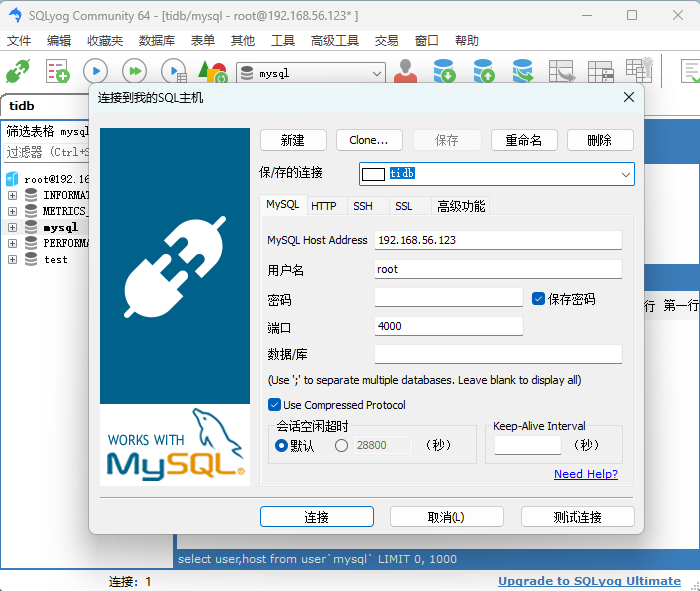 查看用户: 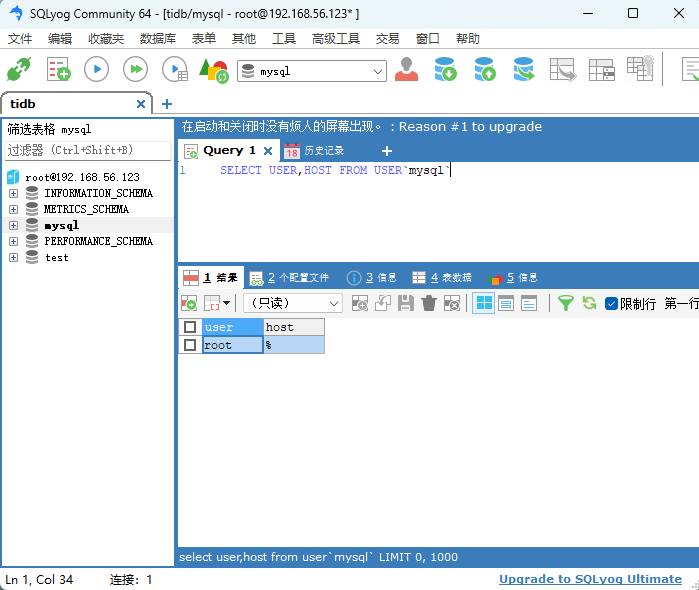 ## 3.2. 数据迁移体验 MySQL ➡️ 平凯数据库敏捷模式:推荐用 DM 工具 从小数据量 MySQL 迁移数据到 TiDB:https://docs.pingcap.com/zh/tidb/stable/migratesmall-mysql-to-tidb/ Oracle ➡️ 平凯数据库敏捷模式:推荐用 TMS/其他工具 TMS 工具申请:https://forms.pingcap.com/f/tms-trial-application
Seven
2025年9月19日 15:12
转发文档
收藏文档
上一篇
下一篇
手机扫码
复制链接
手机扫一扫转发分享
复制链接
Markdown文件
PDF文档(打印)
分享
链接
类型
密码
更新密码